Best Social Media Scheduler for Instagram: Boost Growth
Author:

You've probably done this before. A post is ready, the caption is polished, the creative looks right, and then your day gets interrupted because the “best” time to publish lands in the middle of a meeting, dinner, or the one hour you weren't planning to be on your phone.
That's where most Instagram workflows break. The problem isn't just manual posting. It's that manual posting turns content distribution into a series of interruptions instead of a repeatable system. You end up reacting to the calendar instead of running it.
A good social media scheduler for Instagram fixes more than timing. It gives you consistency, protects your attention, and creates space to do the work that grows an account: sharper creative, better audience conversations, and cleaner performance reviews. That matters because Instagram users spend an average of 33.1 minutes per day globally, while Gen Z users spend 53 minutes daily according to Blankspaces' Instagram screen time breakdown. If your audience shows up daily and you don't, you're giving away visibility.
Table of Contents
Beyond Automation Reclaiming Your Time and Strategy
A common reason to seek a social media scheduler for Instagram is the desire to save time. That's fair, but it's only half the reason to use one. The bigger win is strategic control.
When posting stays manual, every piece of content competes with everything else in your day. A founder stops building to publish a Reel. A freelancer pauses client work to upload a carousel. A creator leaves comments unanswered because the posting task ate the time meant for engagement. The account may stay active, but the workflow stays chaotic.
Scheduling creates room for better work
A scheduler works best when you treat it like a command center, not a vending machine. You plan the week, line up your assets, assign time slots, and then use the time you've reclaimed for the parts of Instagram that can't be automated well: replying to comments, checking story replies, spotting themes in saves and shares, and refining your next ideas.
Practical rule: Use automation to remove repetitive publishing tasks, not to outsource judgment.
That distinction matters if Instagram is tied to revenue. If your account feeds a sales process, outreach list, or lead generation effort, consistency makes the rest of the funnel easier to manage. Teams building that side of the workflow may also find this guide to generating contactable social media prospects useful, because content visibility only matters if people can move from attention into actual pipeline.
Consistency is a strategic asset
Consistency doesn't mean posting nonstop. It means publishing on purpose, with enough regularity that your audience learns what to expect from you. That's why scheduling often improves decision-making more than speed. You can finally look at the upcoming week and ask better questions:
Does this mix feel repetitive? Too many sales posts in a row usually become obvious in calendar view.
Are we publishing when followers are active? A schedule reveals timing patterns quickly.
Did we leave room for live moments? A rigid queue without open space usually backfires.
For a broader look at how automation supports repeatable marketing systems, this piece on social media marketing automation is a useful companion.
How an Instagram Scheduler Actually Works
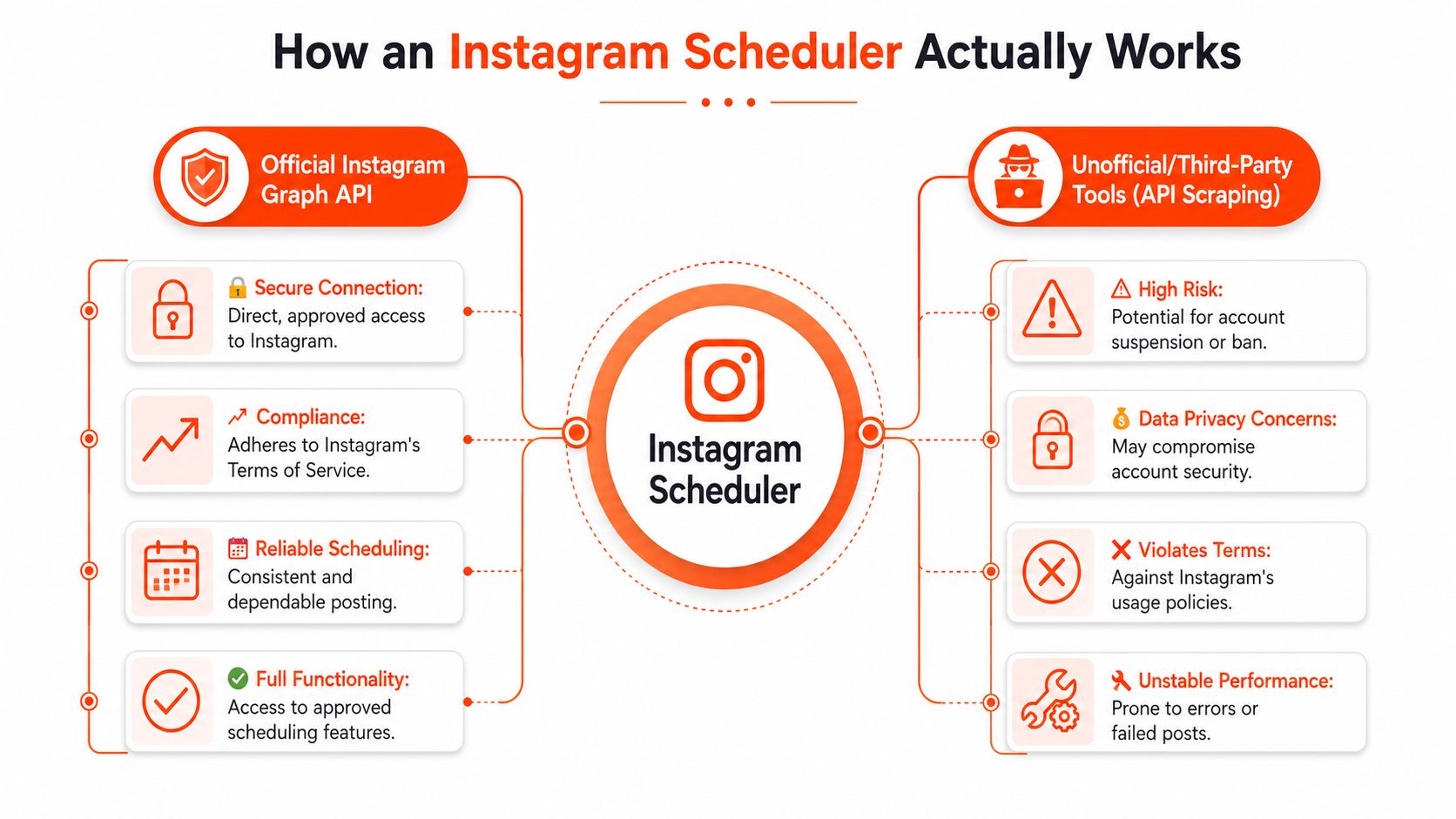
A scheduler isn't magic. It's a layer between your content plan and Instagram's publishing system. The quality of that connection decides whether your posts publish smoothly or whether you get a reminder at the last second and still have to finish the job yourself.
The difference between real publishing and reminders
The easiest way to think about it is this: one type of scheduler acts like a pre-approved courier. The other acts like a calendar alarm.
With official API-based publishing, the scheduler is authorized to deliver the content directly to Instagram at the scheduled time. With notification-based tools, the platform can only remind you that it's time to post, and you still need to step in. That's a huge workflow difference.
Instagram schedulers require a Business or Creator account linked to a Facebook Page to use the official Instagram Graph API for auto-publishing, because personal accounts don't have those permissions, according to PostEverywhere's explanation of Instagram scheduler requirements.
If a tool can't connect through the official publishing path, you're not buying automation. You're buying assisted manual posting.
That distinction becomes more important with video-heavy workflows. If your team publishes lots of short-form content, it's worth understanding the technical side of video delivery and media handling through services like the Instagram video API, especially when content operations get more complex.
What you need before any tool will work properly
Before you compare platforms, check your setup first. Most failed scheduler rollouts come from account configuration problems, not bad software.
Here's the basic checklist:
Use the right account type: Your Instagram account should be Business or Creator.
Link the Facebook Page: That connection is what enables official auto-publishing access.
Authorize the scheduler carefully: Approve the right account and verify you're not connecting the wrong brand profile.
Test one live post first: Don't load a full month before you know the connection works.
A useful concept here is posting slots. Instead of deciding from scratch every time, define recurring windows for specific content types and assign posts into them. That's the logic behind scheduling slots for maximum engagement.
Reliability matters more than flashy features
A beautiful calendar doesn't help if posts fail or publish late. In practice, the best scheduler is usually the one with the cleanest official connection, predictable publishing behavior, and a setup your team can understand without support tickets every week.
That's why experienced managers usually ask technical questions first. Can it auto-publish through the approved route? Can it handle the content formats you use? Can someone on the team verify the queue quickly on mobile? If the answer is shaky, the rest of the feature set doesn't matter much.
Core and Advanced Features Your Scheduler Needs
People often overbuy schedulers for the wrong reasons. They choose based on dashboards, buzzwords, or AI labels, then realize the tool doesn't support their actual workflow. The better approach is to separate must-have features from performance features.
The features that should be non negotiable
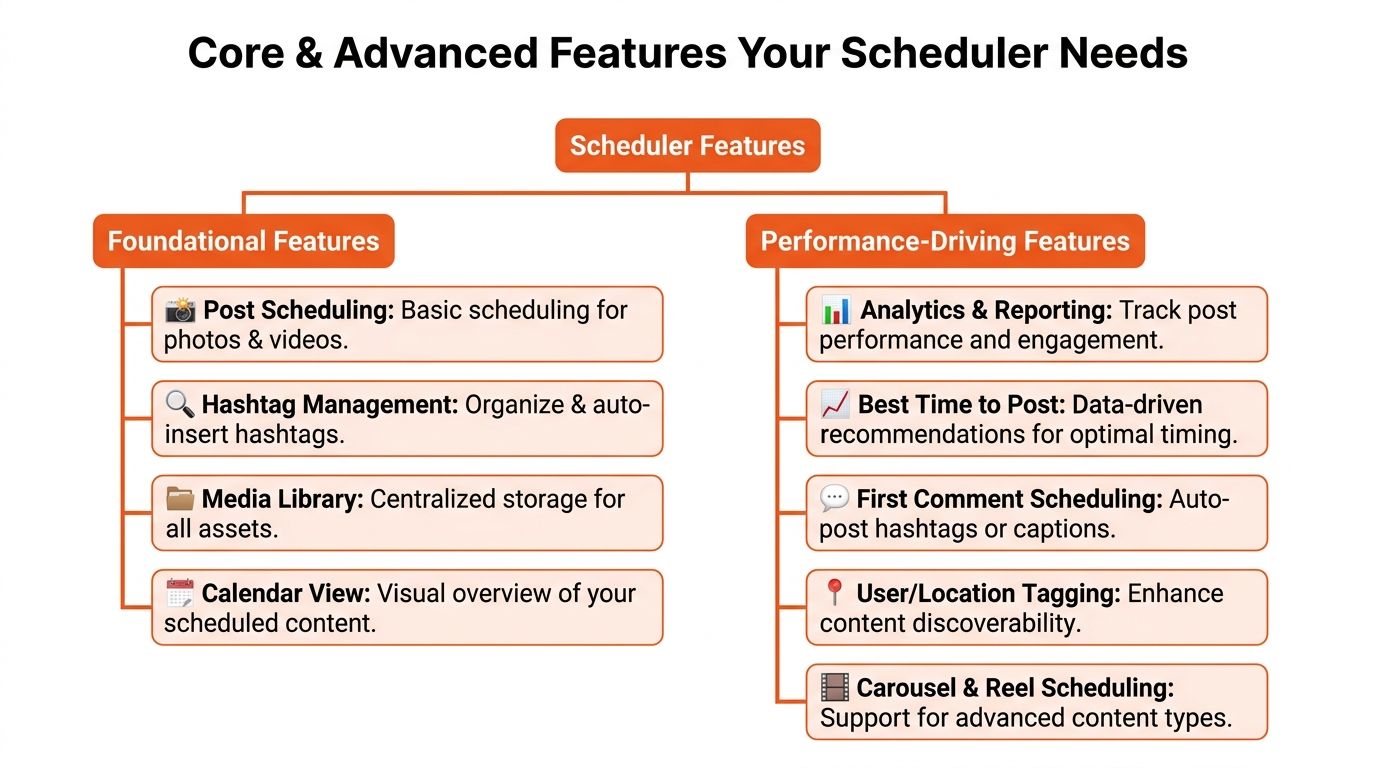
Your scheduler should first do the obvious jobs well. If it can't, the advanced layer is irrelevant.
Instagram's native scheduling framework allows content to be queued up to 75 days in advance, with a hard cap of 25 scheduled posts per day per account, as described by Planable's guide to scheduling Instagram posts. That matters because any serious scheduler has to work inside those limits rather than pretend they don't exist.
The foundation should include:
Direct publishing support: It should handle the formats you post, especially Reels, Stories, carousels, and standard feed posts.
A visual calendar: You need to see content spacing, format distribution, and collisions at a glance.
A media library: Without a central asset hub, teams waste time hunting for the latest cover image, caption version, or approved edit.
Mobile previewing: Feed crops, line breaks, and cover choices often look different on a phone than on desktop.
A strong calendar view is especially useful when you're trying to spot weak sequencing. If three sales-forward posts sit back to back, it will show up immediately in a visual planner like the type described on the SupaBird calendar feature page.
The features that improve decisions not just convenience
Once the basics are covered, the next tier should help you publish smarter, not just faster.
Planable also notes that advanced schedulers use per-account best-time-to-post heatmaps based on historical audience engagement data. That's useful because it grounds timing in your account's behavior instead of generic advice. Still, there's an important trade-off: some tools market “AI-optimized” timing aggressively, but independent validation of those premium claims remains unclear based on the verified background provided earlier. Treat time recommendations as inputs, not gospel.
Here's the advanced layer that usually earns its keep:
Hashtag group management: Saving tested sets helps you move faster, but the primary benefit is keeping different themes organized so you don't repeat irrelevant tags.
First comment scheduling: Useful when you want cleaner captions or need to separate supplementary info from the main post copy.
User and location tagging: This reduces last-minute manual edits and supports discovery workflows.
Analytics beyond native views: You want easy post-by-post comparisons so you can review what content merited another slot.
The best advanced feature isn't the one that looks smartest in a demo. It's the one your team will still use correctly after the novelty wears off.
What doesn't matter as much as people think
Some features sound essential but rarely change outcomes on their own.
A massive template library won't save weak creative. Auto-filled caption prompts won't fix unclear positioning. “Optimal time” badges won't rescue a post that doesn't deserve attention. In practice, good schedulers help good operators move with less friction. They don't replace editorial judgment.
That's why I'd rather see a clean workflow with simple saved caption structures, organized assets, and a reliable schedule than a bloated tool full of tabs no one opens after week two.
Building Your First Instagram Scheduling Workflow
If your current process is “create today, post today, repeat tomorrow,” the fix isn't a new app alone. It's a production rhythm. The most effective systems are usually boring in the best way. They reduce decisions, group similar tasks, and make publishing feel routine instead of urgent.

Start with one weekly batch not daily scrambling
A practical starting point is simple: schedule exactly 7 Instagram posts in a single 2-hour weekly batch by uploading visuals with captions, previewing on mobile, and setting publish times from Instagram Insights, based on PostPlanify's batching workflow.
That approach works because it groups the highest-friction tasks into one session. Instead of reopening your creative brain every day, you do the planning once, produce once, review once, and schedule once.
Field note: Batching works best when you separate creation energy from publishing pressure. Your ideas improve when they aren't competing with a countdown clock.
This is also where process discipline matters more than inspiration. If your team struggles to move from idea to publish-ready asset, a documented content production workflow can remove a lot of hidden friction.
A practical weekly workflow you can repeat
Here's a clean version of the system I'd give any creator, founder, or social lead who wants a workable first setup.
1. Decide the week's objective
Don't start in the scheduler. Start with the message.
Pick the week's focus before you touch visuals. Maybe you want to educate, launch, nurture, or generate replies. That one decision makes the caption writing and content selection easier because each post now has a job.
Examples:
A coach might build a week around common buyer objections.
A product brand might stack a launch week with feature education and user proof.
A creator might center the week around a recurring series theme.
2. Gather assets in one place
Pull everything into a single folder or media library before scheduling starts. That includes edited videos, thumbnails, stills, draft captions, and any links or references you'll need.
This seems basic, but scattered assets are what make “quick scheduling” sessions drag. Once the library is organized, the scheduler becomes operational instead of investigative.
3. Draft captions in clusters
Write all the captions in one sitting. Your voice stays more consistent when you stay inside the same editorial mindset for a block of time.
A useful pattern is to prep by post function:
Reach posts: Shorter hooks, faster payoff, cleaner CTA.
Trust posts: More context, clearer teaching, stronger structure.
Community posts: More conversational copy, easier reply prompts.
You don't need every caption to sound the same. You do need them to sound like the same account.
4. Place content into the calendar
Now use the scheduler the way it should be used. Drop each post into a specific slot and review the week visually.
Look for friction points:
Are all the videos clustered too tightly?
Did you accidentally line up similar hooks back to back?
Is there room to insert a reactive post if a trend matters to your audience?
Scheduling shifts from logistics to strategy. Calendar placement shapes how the audience experiences your account over time, not just how one post performs in isolation.
5. Preview on mobile before you lock it in
Never skip this. Desktop confidence causes mobile mistakes.
Check:
caption breaks
cover image crop
carousel ordering
spelling in overlays
tags and mentions
whether the first line earns the tap
A post that looked finished in a desktop dashboard can still feel off once it sits in the actual mobile environment users see.
6. Publish automatically and stay available
Automation should handle the release. You should handle the response.
That means being present to answer comments, react to DMs, and notice whether the post is attracting the right kind of interaction. Scheduling should free your attention for active community management, not remove you from the conversation.
A sample operating rhythm
If you want this to become habitual, use a simple repeatable cadence:
Day | Focus |
|---|---|
Early week | Ideation and asset gathering |
Midweek batch block | Draft, upload, preview, schedule |
Daily check-ins | Comments, DMs, story interaction |
End of week | Review wins, misses, and next week's carryover ideas |
That rhythm is easier to sustain than chasing the perfect post every day. Sustainable systems usually outperform heroic effort because they survive busy weeks.
How to Choose the Right Type of Scheduler for You
You don't need the “best” scheduler in the abstract. You need the one that fits your workload, content style, and operating constraints. Most buying mistakes happen when people compare tools by popularity instead of by workflow fit.
A useful starting point is budget. According to Viraly, by 2026 Meta Business Suite is projected to be the best completely free Instagram scheduler, offering native scheduling for posts, Stories, and Reels with no monthly limits, as outlined in Viraly's review of Instagram schedulers. For a solo creator or small business with straightforward needs, that changes the equation.
Free tools fit simple operations
Free tools are usually enough when the operation is light and the process is simple.
That means they often work well if:
You run one brand account: Fewer handoffs means fewer workflow requirements.
You don't need approvals: If nobody needs to review copy before publish, a lean setup is fine.
You mostly need scheduling, not reporting: Publishing may matter more than dashboard depth.
You want native reliability: Staying close to Instagram's own ecosystem reduces complexity.
Paid tools earn their place when the workflow gets heavier
Paid platforms make sense when the cost of manual coordination becomes larger than the subscription.
Common signals that you've outgrown a basic tool:
multiple contributors need access
drafts require approval before posting
the content mix is more complex
reporting has to be shareable with clients or leadership
your asset library is getting messy
Don't upgrade because a feature list looks impressive. Upgrade when your current workflow creates repeated friction you can name.
Scheduler Decision Criteria
Your Need | Look For Free Tools (e.g., Meta Business Suite) | Look For Paid Tools (Specialized Platforms) |
|---|---|---|
Solo creator publishing consistently | Simple native scheduling and easy post setup | Better organization if your content volume grows |
Small business with limited budget | No-cost scheduling for core Instagram formats | Added workflow support if several people contribute |
Team collaboration | Basic access may be enough for one operator | Approval paths, shared calendars, and cleaner permissions |
Heavy Reels and Stories output | Support for native publishing across formats | Stronger media handling and content organization |
Reporting needs | Basic operational visibility | More polished analytics and easier stakeholder review |
A practical way to choose is to score tools against your actual weekly workflow. Not your ideal future workflow. Not the use case from a product demo. How many people touch posts before they go live? How many formats do you publish regularly? How often do you need to change scheduled content at the last minute? Those answers will narrow the field quickly.
Instagram Scheduling Best Practices and Pitfalls
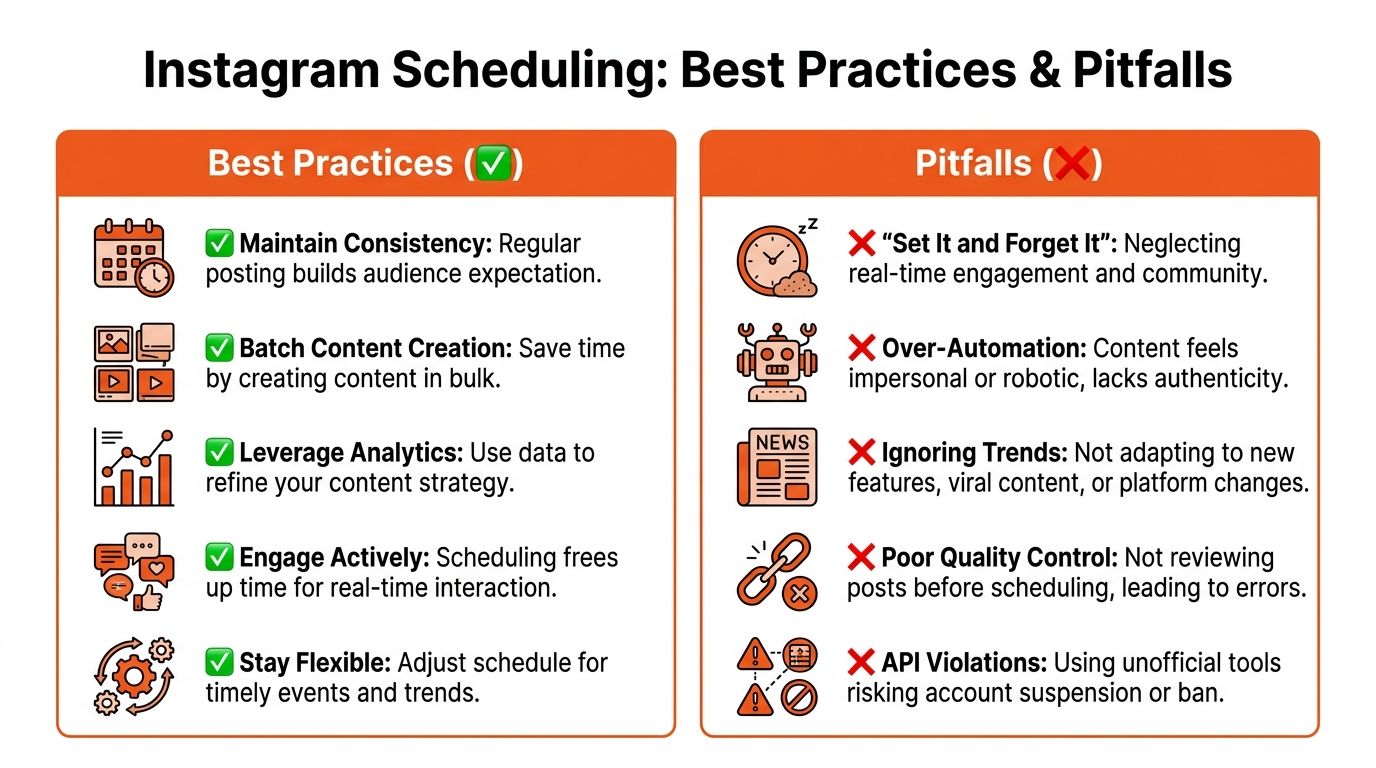
Scheduling improves performance only when it supports a living content strategy. Used well, it makes your account more deliberate. Used poorly, it makes your account feel preloaded and absent.
What keeps scheduled content effective
Your content calendar should stay balanced. Evergreen Feed recommends a mix of 40–50% Reels, 20–30% Stories, 15–20% carousels, and 10–15% static posts for a high-performance Instagram calendar in its Instagram content calendar guide. That framework is useful because it gives each format a role instead of treating every post type as interchangeable.
A few habits make that mix work in practice:
Plan ahead, but not too far: Scheduling content a few weeks out gives you structure without making the calendar too rigid.
Keep space for live moments: Trends, customer wins, and timely updates still need room.
Use your reclaimed time well: Replying to comments and DMs keeps the account human.
Review before posting: A mobile preview catches mistakes your desktop workflow won't.
What makes scheduled content feel dead
The biggest mistake is adopting a “set it and forget it” mindset. A queue full of posts doesn't equal audience connection. If nobody is present when content goes live, the brand starts to feel automated in the worst way.
Other common problems show up fast:
Over-automation: Every caption sounds templated, every CTA feels recycled.
Weak quality control: Wrong crop, outdated offer, broken mention, stale hashtag group.
No flexibility: The calendar is packed so tightly that you can't respond to anything timely.
Risky tooling choices: If a platform relies on unstable publishing methods, you're building on shaky ground.
Good scheduling removes urgency. It shouldn't remove presence.
A social media scheduler for Instagram should make your publishing calmer, not colder. The strongest accounts use automation for delivery and keep the human layer where it matters most: creative judgment, timely replies, and real audience attention.
If you want the same kind of disciplined publishing system for X, SupaBird is built for that job. It helps creators, founders, and marketers turn scattered ideas into a working content engine with AI-assisted ideation, scheduling, engagement support, and timing recommendations that make consistency easier to maintain.

The Reply Guy Strategy: A Growth Guide for X

Why New X Accounts Get Less Reach

ClimbX Review (2026): Features, Pricing, Pros and Cons

How Developer Startups Build a Brand on X Before Launch

30-Day Starting Plan for New X (Twitter) Accounts

How Often Should You Tweet for Maximum Growth?

What Should Your First 10 Tweets Be About?

How to Run X for Ten Clients: The Agency Workflow

How to write a bio that gets people to follow you
