Streamline Your Content Production Workflow for X/Twitter
Author:

Most advice about content says the same thing. Post more. Stay spontaneous. Capture thoughts in real time. Keep it authentic.
That advice sounds good on X. It breaks down the moment a creator tries to do it every week.
Spontaneity is useful at the post level, not at the system level. A creator who wings every idea, every draft, every edit, and every publishing decision usually ends up with missed posting days, half-finished threads, and a feed that feels random. A creator with a lean content production workflow has more room for sharp opinions, faster reactions, and cleaner execution because the boring parts already have a home.
For solo creators and small teams, that matters more on X than almost anywhere else. The platform rewards consistency, quick iteration, and clear positioning. That doesn't require an enterprise stack. It requires a process that captures ideas fast, drafts in batches, edits with discipline, and publishes without friction.
Table of Contents
The End of Content Chaos and Burnout
The biggest myth in creator circles is that workflows kill creativity. The opposite is usually true.
Creators burn out when every posting session starts from zero. They open X, scan the timeline, save a few posts, think of three ideas, draft one, edit another, abandon both, then tell themselves they'll post later. That isn't freedom. It's constant task switching.
The better model is sustainable velocity. The work gets lighter when similar actions happen together. The evidence behind creator workflows points in that direction. Content creators often look for ways to increase output without burning out, and the clearest fix is grouping similar tasks into batches rather than trying to create in a scattered way, as discussed in this workflow discussion on sustainable velocity and batching.
Why burnout usually starts with inconsistency
A creator who batches idea capture on Monday, drafting on Tuesday, and scheduling on Wednesday has fewer mental resets than a creator who does all three every day.
That matters on X because the platform creates pressure to react instantly. Some posts should be reactive. Most shouldn't. A sharp reply to breaking news can be written live. A founder's recurring content pillars, product insights, customer lessons, and authority threads should already be in motion.
Practical rule: If content feels exhausting, the problem usually isn't volume first. It's workflow inconsistency.
A simple weekly rhythm often works better than an ambitious daily one:
Idea session: Save hooks, questions, screenshots, and hot takes in one sitting.
Draft session: Turn the best ideas into rough posts without editing mid-sentence.
Edit session: Tighten hooks, remove fluff, and sharpen the CTA.
Schedule session: Load the week's posts so consistency doesn't depend on mood.
For creators who want less manual switching between writing, queueing, and follow-up tasks, this guide on social media marketing automation is a useful companion.
What freedom actually looks like
A structured content production workflow doesn't make the feed robotic. It removes low-value decisions.
The creator still chooses the angle, the story, the joke, the opinion, and the timing of reactive posts. The system prevents the blank-page panic that wrecks consistency. On X, that's often the difference between building momentum and disappearing for ten days.
Designing Your Five-Stage Content Assembly Line
The cleanest workflows all converge on the same pattern. Planning, Creation, Review, Publishing, and Tracking form the standard five-stage pipeline, and that model exists for a practical reason. It solves the most common bottleneck in content teams, which is the unmanaged handoff between stages, as outlined in this five-stage content workflow guide.
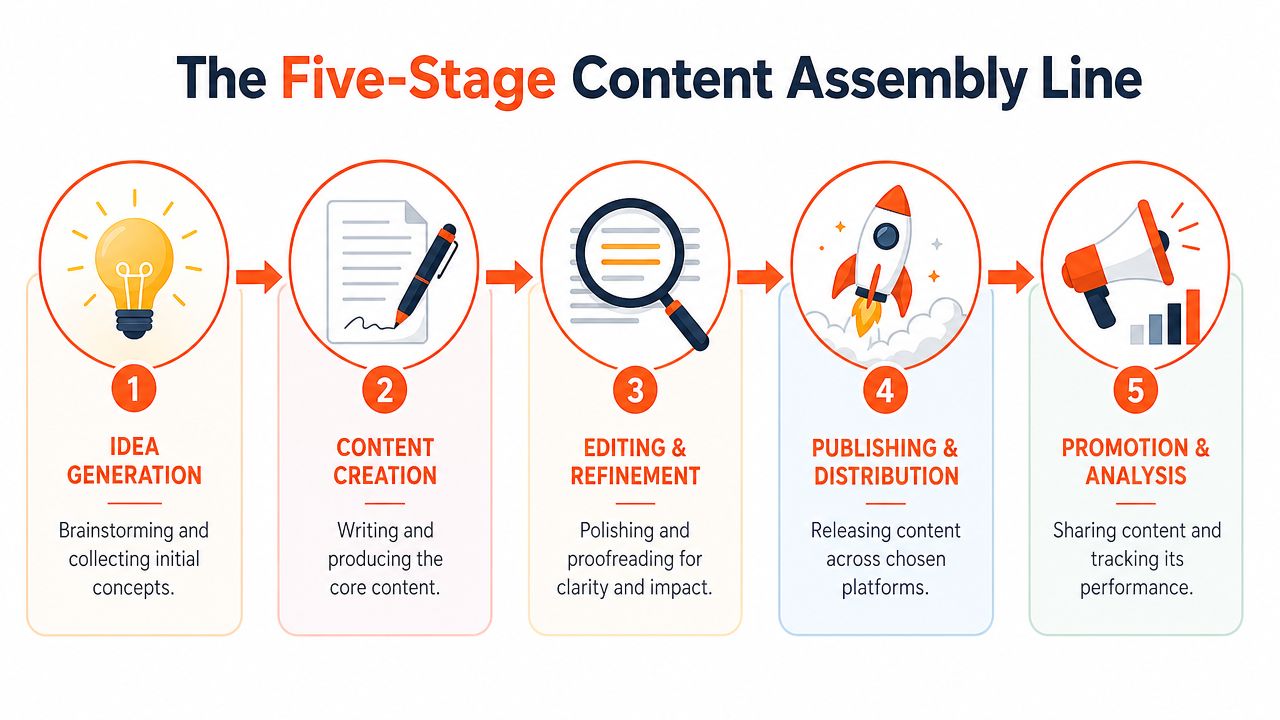
For a solo creator on X, those handoffs happen inside one person's calendar. For a small team, they happen between founder, writer, editor, and scheduler. In both cases, the fix is the same. Split the work into distinct stages and stop trying to build while sorting the pieces.
Why separation beats multitasking
A useful analogy is LEGO. Building is easy when the pieces are sorted first. Building is slow when every minute starts with searching.
The same applies to posts. When planning, drafting, polishing, and publishing happen in one sitting, attention gets shredded. A creator starts writing while still deciding the angle. Then editing starts before the point is clear. Then publishing gets delayed because the visual isn't ready.
A lighter assembly line looks like this:
Planning
Pick themes for the week. On X, that might be founder lessons, product breakdowns, customer objections, and contrarian takes in the niche.Creation
Write rough drafts fast. No formatting obsession yet. Just get the point on the page.Review
Tighten wording, check the logic, improve readability, and make sure the post sounds like one person wrote it.Publishing
Queue posts with dates and times already chosen.Tracking
Review what got replies, reposts, profile clicks, and follow-through conversations.
A creator building a weekly system around themes and posting cadence can get useful ideas from this piece on social media content strategy.
What each stage looks like on X
X is short-form, but the workflow still benefits from structure.
Stage | X-specific example | Common mistake |
|---|---|---|
Planning | List 10 angles from customer questions | Picking topics only from mood |
Creation | Draft 7 posts in one writing block | Editing every line while drafting |
Review | Rewrite the hook and trim dead words | Sending weak drafts straight to queue |
Publishing | Schedule a full week in advance | Posting manually whenever remembered |
Tracking | Note which hooks earned replies and clicks | Looking only at vanity reactions |
The tool stack can stay minimalist. A notes app for capture, Google Docs for drafts, a scheduler for publishing, and analytics inside X are enough for many creators. For people who dictate ideas while walking or between meetings, optimizing speech to text for daily tasks can make the Planning and Creation stages faster without adding more friction.
The assembly line isn't rigid. It's just clean. Clean systems leave more room for original thinking than messy ones do.
Building an Unstoppable Idea Capture System
The blank page is usually a capture problem, not a creativity problem.
Most creators don't run out of ideas. They let ideas pass by uncaptured. A strong post often starts as a reply, a DM, a customer objection, a screenshot, or a line from a podcast that triggers disagreement. If that spark isn't stored somewhere usable, it disappears.

One conversation can become a week of posts
A simple example shows how this works on X.
A founder sees someone post, "Posting every day doesn't work if the content says nothing." That single line can branch into multiple assets:
Hot take post: Consistency doesn't save weak positioning.
Thread: Why volume helps only after message clarity.
Reply post: Three signs a content calendar is hiding a strategy problem.
Story post: A week of posting with no point produces noise, not trust.
Question post: What's one topic people know the creator for right now?
That expansion only happens when the original insight gets captured in a system instead of left in bookmarks forever.
Some ideas outgrow the post format. A thread that keeps expanding, a topic the creator can't stop returning to, or a set of lessons that only make sense together are signs the idea belongs in something longer than a feed. For that jump, a tool like AI book writer can take that raw material and structure it into a full manuscript, so the same capture habit that feeds a week of X posts can also feed a book instead of dead-ending in a notes app.
Workflow note: Bookmarks are for reading again. An idea bank is for turning observation into output.
A creator who wants more ways to fill that bank can use this resource on how to find content ideas.
A simple idea bank that stays usable
The best idea bank is the one that gets reviewed weekly. Fancy databases don't help if they become a graveyard.
A lightweight structure in Notion, Google Docs, or a spreadsheet is usually enough. Four fields handle most use cases:
Field | What goes in it |
|---|---|
Raw idea | The original thought, quote, screenshot, or question |
Content angle | Lesson, opinion, story, contrarian take, tutorial |
Format | Single post, thread, reply, quote-post, visual post |
Status | Captured, outlined, drafted, scheduled |
One useful pattern is the swipe file. Save strong hooks, post structures, and opening lines from creators in the niche. Not to copy them. To recognize patterns. Hooks like "Many believe X, but the underlying issue is Y" or "A hard lesson from building in public" can become templates for original arguments.
Later in the week, the creator can turn raw notes into outlines. That is the moment to frame the post:
What belief is being challenged?
Who is this post for?
What specific example proves the point?
What action should the reader take next?
For creators who prefer seeing the workflow in action, this walkthrough shows how captured ideas can be turned into publishable content without overcomplicating the process.
One product option in this stage is SupaBird, which includes an Ideas Lab that helps generate concepts based on creators and formats a user already follows. Used well, a tool like that supports the capture system. It shouldn't replace judgment about what fits the account.
Streamlining Drafts with AI and Proven Templates
AI changes drafting speed. It doesn't remove the need for editorial discipline.
The useful way to think about it is this. AI handles the repetitive structure work. The human handles perspective, specificity, and taste. That split matters because the biggest gain in a content production workflow comes from accelerating the rough draft without publishing generic output.
The production gap is already visible in workflow data. Manual workflows average 6 articles per month, AI-assisted workflows average 11 articles per month, and advanced generative AI workflows can reach 19 articles per month, according to Neil Patel's monthly content output benchmarking. For X creators, the format differs, but the lesson is the same. Drafting speed changes when the first version doesn't start from a blank page.
Where AI does the heavy lifting
AI is strongest when the creator gives it structure.
Good inputs for X drafting include:
Outline to draft: Turn three bullet points into five versions of a short post.
Hook generation: Rewrite one idea into punchy openings with different tones.
Format conversion: Convert a thread into a single post, quote-post reply, or carousel caption.
Compression: Cut a long thought into a tighter post without losing the core argument.
That works best inside a batching session. A creator can line up ten outlines, run each through the same prompt pattern, then choose the strongest draft and edit from there. Templates help even more because they reduce decision fatigue. A bank of formats like "contrarian claim plus proof," "story plus lesson," and "mistake plus fix" keeps output varied without reinventing structure every time.
For creators building that kind of system, these templates for faster content creation make the drafting stage easier to repeat.
What the human still has to own
The mistake is treating AI like autopilot. The stronger model is co-pilot.
One workflow insight from AI-first teams is that AI does 80% of the heavy lifting, but many teams still lack clear review checklists for the final human pass, especially around persona fit and CTA clarity, as described in this AI-first workflow analysis. On X, that final pass decides whether the post sounds sharp or forgettable.
A human should still check:
Voice: Does the post sound like the account, not like a writing assistant?
Specificity: Are there concrete examples, or just polished abstractions?
Risk: Could the wording create unnecessary confusion or brand issues?
Hook strength: Would this stop a niche follower mid-scroll?
CTA fit: Does the post invite a reply, profile click, or deeper conversation naturally?
A fast draft isn't a finished post. It's raw material with momentum.
Templates and AI are powerful because they remove hesitation. They don't remove responsibility.
Mastering the Polish and Publish Machine
A draft earns reach only after it gets tightened.
Many creators lose time by either under-editing and publishing vague posts, or over-editing and never hitting schedule. The answer isn't perfection. It's a short polish system with clear exit criteria.
The review cycle data is useful here. Efficient workflows keep review cycles at 1.5 to 2.5 per piece, while unclear guidelines can push that to 5+ cycles, which correlates with a 30% reduction in time-to-publication. Bringing in subject matter review early also prevents factual fixes that can add 4 to 7 days later in the process, according to this content production system analysis.
A final polish checklist for X posts
For a solo creator, "review cycles" usually means how many times the post gets rewritten before it finally goes out. For a small team, it means how many rounds happen between founder, editor, and approver.
A practical checklist keeps that under control:
Hook first: The opening line must create tension, curiosity, or recognition. If the first line is flat, the rest won't save it.
One point only: Posts with three messages usually land as zero messages. Cut until one idea remains.
Concrete proof: Add a screenshot, observation, or short example when possible.
Readable shape: Use line breaks. Dense blocks die on X.
Clear CTA: Ask for a reply only when it fits. Not every post needs forced engagement bait.

Visuals help too, especially for educational or product-led content. That doesn't mean elaborate design. A screenshot, marked-up image, meme, simple chart, or short screen recording often does enough to stop the scroll and add context.
Scheduling turns consistency into default behavior
Manual posting feels noble until life gets busy.
Scheduling is what turns a good workflow into a reliable one. When the week's polished posts are already queued, consistency no longer depends on whether the creator feels inspired at 4:30 p.m. That matters on X because silence breaks momentum faster than most creators admit.
A simple publish routine for one weekly session works well:
Review all final drafts in one sitting.
Attach visuals only where they increase clarity.
Stagger formats across the week so the feed doesn't feel repetitive.
Leave a few open slots for reactive posts and strong replies.
Queue everything else.
Small teams benefit from a cleaner approval path too. A structured chain of Owner → Editor → Reviewer → Publisher helps limit unnecessary reviewers and keeps version history cleaner, especially when comments live in one shared document or CMS record, as explained in this guide to high-performance content operations.
The polish stage should improve the post, not trap it. If a post keeps cycling, the checklist is unclear or too many people are touching it.
How to Optimize and Scale Your Workflow
The strongest workflows get better because they close the loop.
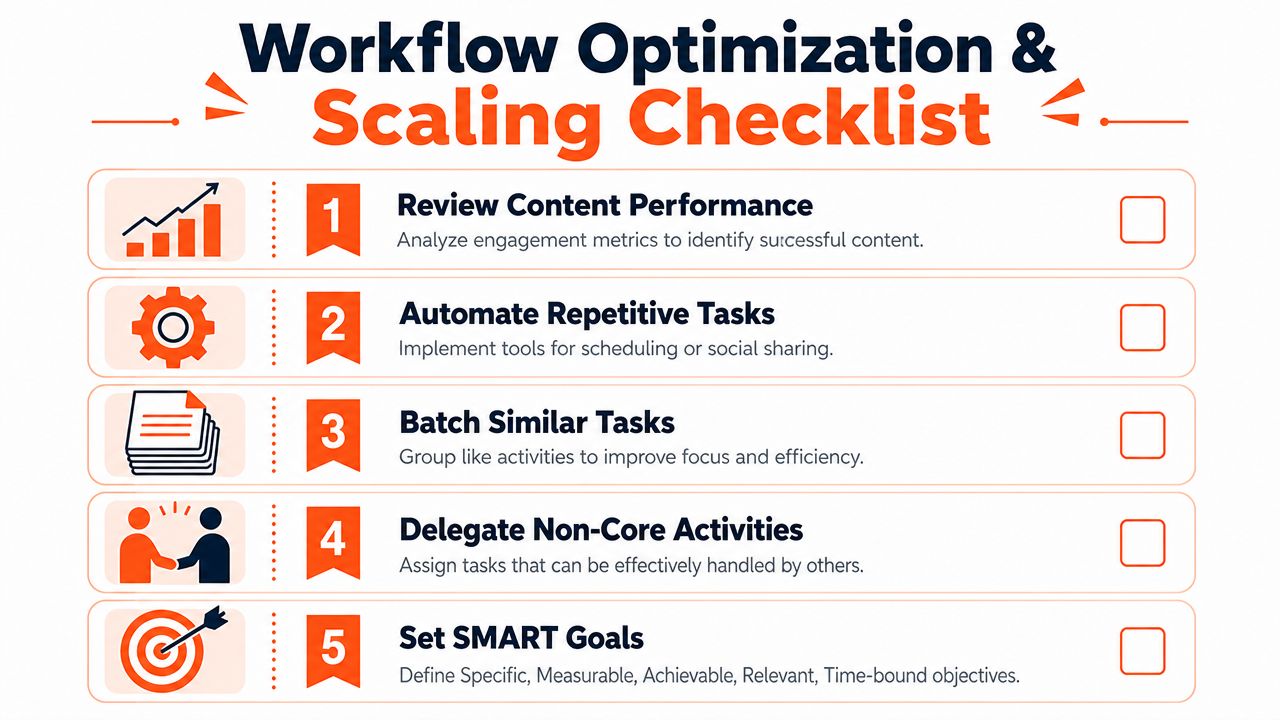
Tracking doesn't need to become a dashboard obsession. For X, a creator can review a small set of signals each week and make better decisions from them. Impressions show whether the hook and topic earned distribution. Engagement rate shows whether the post held attention. Profile clicks show whether the content built enough curiosity to move someone closer.
Track the few signals that change decisions
A weekly review can stay simple:
Question | What to look for |
|---|---|
Which hooks got distributed? | Posts with strong impressions relative to the account's norm |
Which posts started conversations? | Replies with substance, not just surface reactions |
Which topics pulled people deeper? | Profile clicks and follow-on discussion |
Which formats dragged? | Posts that felt flat despite good timing |
That review should feed directly back into Planning. If short contrarian posts outperform long explanatory threads, the creator should draft more of them next week. If screenshots pull stronger responses than text-only product posts, visuals should become part of that content lane.
Scaling comes next. Once the workflow is stable, some tasks can move to a contractor or assistant. At that point, ownership matters more than adding more hands. A single project owner model can reduce bottlenecks by 40% in teams that previously lacked centralized ownership, according to Claravine's workflow guidance. Even in a two-person setup, one person should own the asset end to end.
Simple SOP Template for a Content Assistant
Task | Owner | Tool(s) | Frequency | Definition of Done |
|---|---|---|---|---|
Collect content ideas from X replies, bookmarks, and customer chats | Assistant | X, Notion, Google Docs | Daily | At least a fresh set of tagged ideas is added to the idea bank with source context |
Turn approved ideas into outlines | Creator | Notion, Google Docs | Weekly | Each chosen idea has a hook, angle, format, and CTA note |
Prepare rough drafts from outlines | Creator | Google Docs, AI writing tool | Weekly | Drafts are complete enough for edit, not just bullet points |
Polish visuals and formatting | Assistant | Canva, screenshots, image editor | Weekly | Each scheduled post has final formatting and any needed asset attached |
Queue approved posts | Project owner | Scheduler, X calendar | Weekly | Posts are scheduled, labeled, and visible in the weekly queue |
An SOP doesn't need corporate language. It needs clarity. Who owns the task. Which tool they use. How often they do it. What "done" means.
That is how a solo creator becomes a lean content team without importing enterprise overhead.
A simple workflow is easier to maintain than a complicated one. If the goal is to capture ideas, draft faster, and schedule X content in one place, SupaBird is one option to consider because it combines idea generation, rewriting into proven post formats, and calendar-based scheduling for creators who want a tighter publishing system.

The Reply Guy Strategy: A Growth Guide for X

Why New X Accounts Get Less Reach

ClimbX Review (2026): Features, Pricing, Pros and Cons

How Developer Startups Build a Brand on X Before Launch

30-Day Starting Plan for New X (Twitter) Accounts

How Often Should You Tweet for Maximum Growth?

What Should Your First 10 Tweets Be About?

How to Run X for Ten Clients: The Agency Workflow

How to write a bio that gets people to follow you
