How to Schedule Post on Twitter: 2026 Growth Guide
Author:

You've got good post ideas. They just keep dying in your notes app, your drafts, or your head.
That's the main reason most X accounts stall. It's rarely a lack of insight. It's inconsistent execution. You mean to post in the morning, then meetings happen. You plan a thread for Wednesday, then client work spills over. By the time you open X again, the timing is off and the moment is gone.
If you want to schedule post on Twitter well, treat scheduling as a growth system, not a convenience feature. The shift matters. A calendar doesn't just save time. It protects your consistency, gives your strongest posts a better shot at visibility, and creates enough breathing room for live replies, trend reactions, and actual conversations.
The creators who grow usually aren't improvising every post from scratch. They're running a repeatable publishing workflow. Some posts are planned. Some are reactive. The key is that the account keeps moving, even when the person behind it is busy.
Table of Contents
Why Scheduling Posts Is a Non-Negotiable for X Growth
A common pattern looks like this. A founder posts three strong takes in one week, gets decent replies, then disappears for six days. A consultant writes a sharp thread on Tuesday, promises to post more often, then goes quiet until the next launch. The content isn't bad. The system is.
Scheduling fixes that problem because it removes timing from your daily willpower. You don't need to remember to publish when you're traveling, in calls, or buried in work. The post goes out anyway.
What consistency actually changes
Consistency does two things at once. First, it keeps your account active enough to stay present in your audience's routine. Second, it lets you write when you're focused instead of forcing yourself to produce on demand.
That's a big difference in practice. Scheduled content is usually cleaner, tighter, and more deliberate than rushed content posted between tasks.
Practical rule: If you only post when you “have time,” your feed will reflect your stress level, not your strategy.
Creators often think scheduling is mainly about queueing content in advance. It's more useful than that. It lets you separate creation from distribution. You can write a week's worth of posts in one sitting, then let the schedule handle delivery while you stay available for engagement.
What doesn't work
Scheduling also gets misused. Some people fill a calendar weeks ahead with generic one-liners, then disappear from the platform. That usually produces a flat feed. The account looks active, but it doesn't feel alive.
A better workflow is simple:
Batch your core content: Draft your educational posts, product updates, opinion posts, and evergreen threads in one focused block.
Leave room to react: Keep open space for quote posts, replies, and timely commentary.
Review before publish: A scheduled post written five days ago can feel tone-deaf today if the conversation changed.
Match post quality to timing: Your strongest hooks deserve your strongest time slots.
Scheduling isn't optional if you want steady growth on X. It's the operating system behind consistent publishing.
Choosing Your Scheduling Tool A 2026 Comparison
There are three practical ways to schedule post on Twitter. Use the native X scheduler, use X Pro, or use a third-party platform. All three can work. They just solve different problems.

The quick comparison
Option | Best for | Strength | Limitation |
|---|---|---|---|
Native X scheduler | Solo creators scheduling occasional posts | Free and built in | Limited planning workflow |
X Pro | Heavy X users who monitor multiple streams | Better visibility into live activity | Still not a full content operating system |
Third-party tools | Teams, creators, and brands posting consistently | Calendar, workflow, planning depth | Usually paid |
The pressure point is frequency. Industry consensus from large-scale studies confirms that the optimal posting frequency for growth is 3 to 5 tweets per day, spaced at least 2 to 3 hours apart, according to this posting frequency analysis. Once you're trying to maintain that pace, basic manual posting starts breaking down.
Native X scheduler
If you publish a few times a week and want a free option, the native scheduler is enough. You write the post, pick the time, and it goes live. For single posts, launch reminders, and simple threads, it does the job.
Where it starts to feel cramped is planning. You can schedule individual posts, but you don't get a strong strategic view of your pipeline. That matters once you're balancing launches, replies, repurposed content, and timezone coverage.
X Pro
X Pro works better for people who live inside X during the day. The multi-column layout helps you track lists, notifications, mentions, and keyword streams while still queuing content.
That makes it useful if your workflow is half publishing, half monitoring. It's stronger than the basic scheduler if you want to stay close to the conversation while still planning ahead.
Use X Pro when live monitoring is part of the job. Don't use it as a substitute for a real content calendar.
Third-party platforms
Scheduling becomes strategic instead of mechanical. A proper third-party scheduler gives you a calendar view, post library, better workflow control, and often AI assistance for drafting, rewriting, or repurposing.
If you're comparing tools, it helps to review breakdowns that focus on workflow instead of feature lists. This roundup of X scheduling tools is useful for seeing how different products fit different publishing styles. If you're also refining your broader stack, Nereo's AI marketing tools is a helpful reference for seeing where social scheduling fits alongside idea generation and content automation.
The choice comes down to this. If you need “post later,” native is fine. If you need “grow with intention,” use a platform built for repeatable publishing.
How to Schedule Posts Directly on X Web and Mobile
The native scheduler is simple once you know where X hides it. For many, desktop is still the cleanest place to do this.
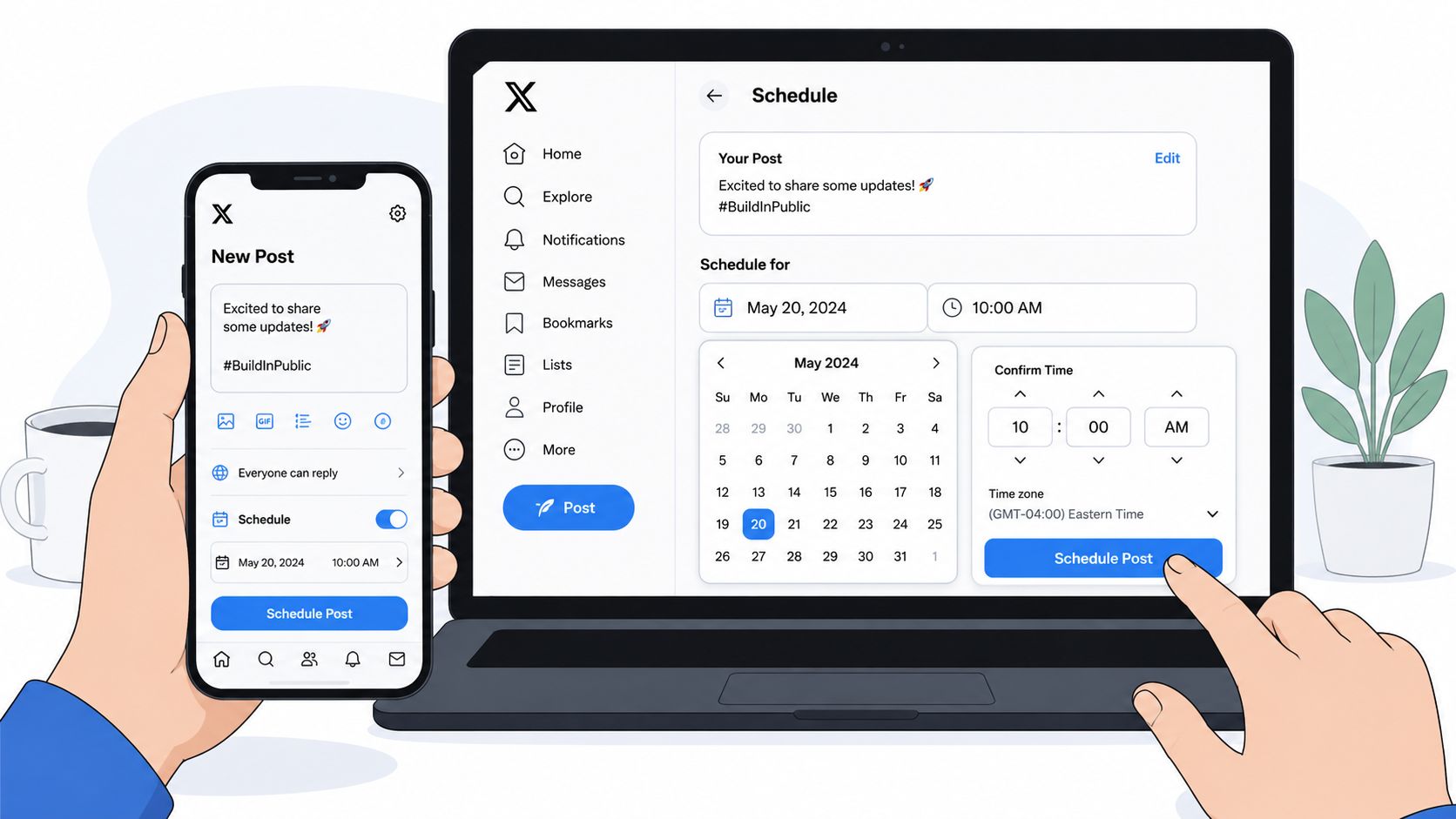
Schedule a single post on X web
Open X in your browser and start a new post. Write your text, attach your image, GIF, or video, then look for the calendar icon with a clock in the composer.
From there:
Write the post first: Finish the copy before choosing the time. It's easier to catch awkward phrasing early.
Click the schedule icon: Set the date and time.
Confirm the time carefully: Double-check that the selected time matches your intended audience window.
Hit Schedule: The post moves into your scheduled queue.
A practical example:
Shipping update for founders: we changed onboarding to reduce setup friction. I'll share the exact changes in a thread tomorrow.
That kind of post works well scheduled ahead, especially if you already know when you want the follow-up thread to land.
Scheduling a thread without making a mess
Threads need more care than single posts. The easiest mistake is scheduling a strong opener with weak follow-ups, or forgetting that the second and third posts need to read cleanly in sequence.
Use this workflow:
Draft the full thread in one sitting: Don't schedule tweet one and “finish later.”
Read each post as a standalone line: People will often see individual posts out of context.
Check image order: If the thread includes screenshots or charts, make sure the media sequence supports the text.
Preview for rhythm: Short opener, clear middle, strong close.
If a thread teaches a process, write the first post like a promise and the rest like delivery. Don't waste the opener on throat clearing.
What about mobile
Mobile scheduling is less comfortable for serious planning, but it's still useful when you're away from your desk. The safest approach is to draft carefully, then confirm the date and time without rushing. Small screen edits create unnecessary mistakes, especially in threads.
A good use case for mobile is scheduling a quick reaction post, a conference takeaway, or a short follow-up tweet after a podcast appearance. A bad use case is building a media-heavy thread while walking between meetings.
Here's a visual walkthrough if you want to see the interface in action before trying it yourself:
Editing or deleting a scheduled post
On web, go back into the composer and open the scheduled posts area. From there, you can edit the text, change the timing, or delete the post.
That sounds minor, but it's operationally important. Scheduling only works when you're willing to revise. If the market shifts, a joke ages badly, or a launch date moves, you need to update the queue fast.
A simple habit helps. Review your next scheduled posts before ending the workday. That catches bad timings, duplicate hooks, and posts that no longer fit the conversation.
Go Pro with an Advanced Scheduling Assistant
Native scheduling handles publishing. It doesn't handle content operations.
That gap matters once your audience spans more than one region, your posting cadence gets serious, or your content engine includes threads, repurposed ideas, and reactive posts. At that point, you need more than a post timer. You need a system that helps you plan, queue, and adjust without losing track of what's live, what's pending, and what still needs work.

The multi-timezone problem most guides skip
If your audience is concentrated in one city, scheduling is straightforward. If you've got followers in Europe, North America, and India, the job changes.
For global audiences, the optimal strategy is posting 2–3 times daily to cover major time zones, according to this guide on scheduling tweets for broader audiences. The problem isn't understanding that. The problem is managing it without bloating your feed or posting the same message badly to everyone.
That's where an advanced scheduler helps. You can map your posting windows to audience clusters, keep variations organized, and avoid the “one global post for everyone” mistake.
What advanced tools do better
A stronger setup usually gives you:
Calendar visibility: You can see the week at a glance, not just one post at a time.
Draft pipeline management: Ideas, work-in-progress posts, and scheduled posts stay separate.
Timezone-aware planning: You schedule for audience behavior, not just your own local clock.
Content batching support: You can build a queue during a writing session and distribute it across the week.
One option in this category is SupaBird, which includes a calendar view for scheduled X posts and supports timezone-aware planning across cities like Berlin, New York, London, and Mumbai. That's the kind of structure that becomes useful when your content strategy is no longer one post at a time.
The native scheduler helps you publish. An advanced scheduler helps you run a publishing system.
A realistic workflow
A creator with a global SaaS audience might draft one educational post, one opinion post, and one product-related post for the day. Instead of dropping them randomly, they assign each to different audience windows and keep room for live commentary if something relevant breaks.
That's the professional upgrade. You stop asking, “What should I post right now?” and start asking, “What should go live for this audience at this time?”
Best Practices for Scheduling Content That Performs
Scheduling helps only if the content lands in the right slot, in the right format, for the right audience. A packed queue by itself won't save a weak plan.
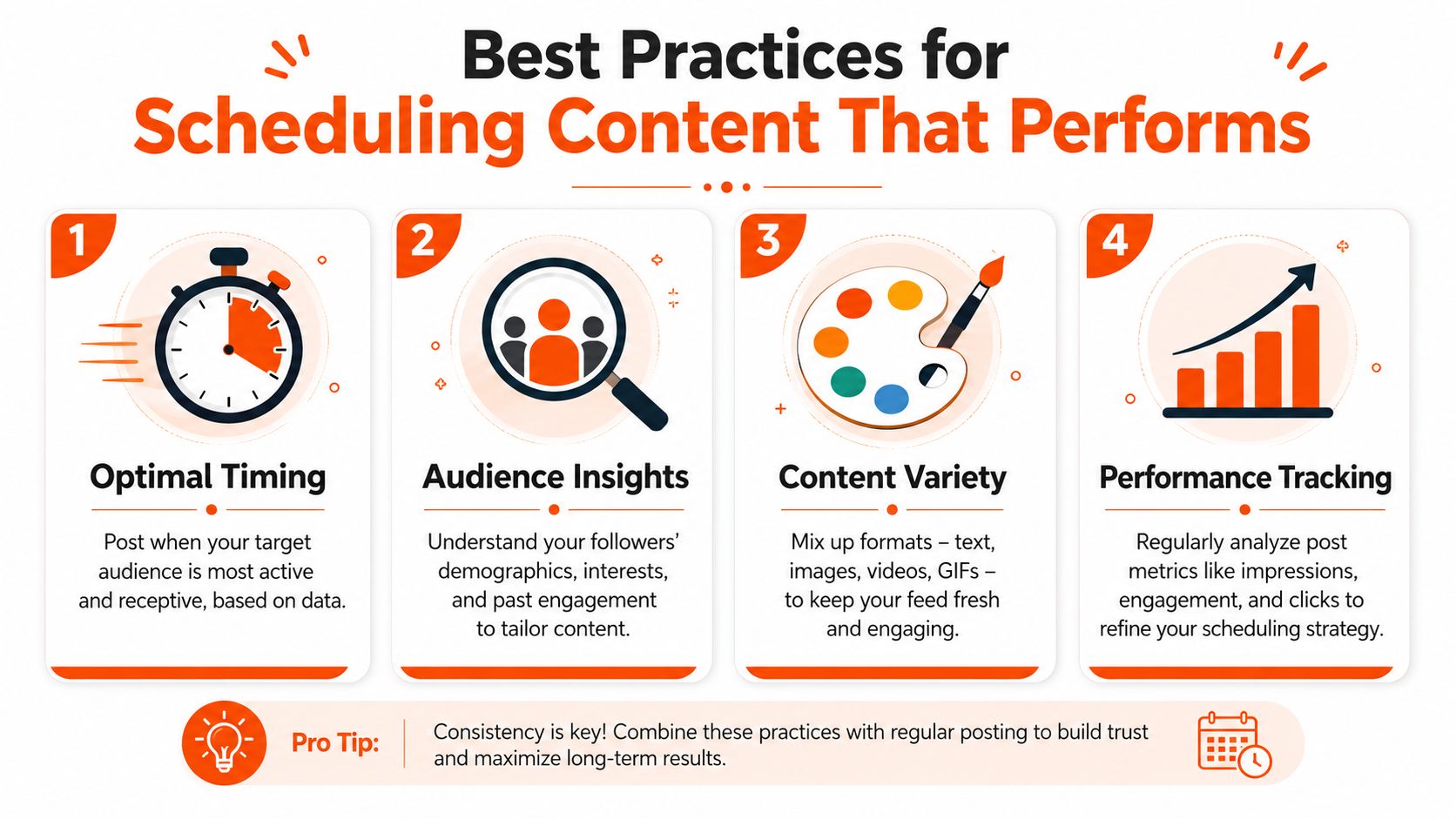
Start with the strongest timing window
An analysis of over 8.7 million tweets identified Tuesday at 9 a.m. as the single best time to post, with the period between 8 and 11 a.m. from Tuesday to Thursday being the consistent sweet spot for engagement across major timezones like New York and London, based on Buffer's research on the best time to post on X.
That doesn't mean every post belongs there. It means your most impactful content should get first claim on that window.
Use that for:
Core authority posts: Sharp opinions, educational breakdowns, and polished hooks.
Important threads: Especially the ones you expect people to save or reply to.
Announcements that need traction: Product updates, launches, event reminders.
Save weaker experiments for secondary slots. Don't waste prime timing on filler.
Match format to intent
Not every post format behaves the same way. A one-line contrarian take can work in a fast-scrolling slot. A long thread usually needs more attention and cleaner timing.
A practical checklist:
For single tweets: Prioritize speed, clarity, and a strong first line.
For threads: Make sure tweet one creates tension or curiosity without becoming clickbait.
For image posts: Confirm the visual still makes sense on mobile before scheduling.
For repost strategy: Keep your distribution clean. If reposting is part of your plan, this guide on when and why to schedule retweets on X-why-it-matters-and-how-to-use-it-for-growth) covers the logic well.
A scheduled post should still feel native to the timeline. If it reads like a queued obligation, people will scroll past it.
Audit your own winners
Generic best times are the starting point. Your own account history should refine the plan.
Look back at your recent posts and ask:
Which time slots produced your strongest replies?
Do short takes outperform threads at the same hour?
Which posts got impressions but weak engagement?
Are certain topics tied to certain times of day?
That last point matters more than most creators realize. Sometimes the issue isn't the schedule. It's that you're posting the right idea in the wrong context.
Keep the queue flexible
A good schedule is stable, not rigid. You should be able to edit, move, or delete queued posts when the conversation changes.
That's why the strongest operators keep a live queue and a clean review habit. They don't just schedule content. They manage it.
Common Scheduling Questions and How to Fix Them
The biggest fear people have is simple. If I schedule posts, will they feel less real?
Not if you use scheduling correctly. A proven strategy is to lock in 80% of your evergreen content with a scheduler while keeping 20% of slots open for live topics, according to this scheduling workflow breakdown. That split works because it protects consistency without turning your feed into autopilot.
Quick fixes that solve most issues
Scheduled post feels stale: Rewrite or delete it. Don't publish a post just because it's in the queue.
Timezone confusion: Schedule based on audience location, not your laptop clock.
Media looks off: Recheck image crop, attachment order, and preview before locking it in.
You're over-automating: Use open slots instead of filling every hour. A fixed queue needs breathing room.
Your calendar is chaotic: Use structured posting windows. Tools that support smart scheduling slots make this much easier to manage.
The right mindset is this. Scheduling should handle repetition. You should handle judgment.
If you want a cleaner way to batch ideas, organize your queue, and publish on X without losing flexibility, SupaBird is built for that workflow. It combines idea generation, rewriting, engagement support, and a scheduling calendar in one place, which is useful when you're trying to grow without turning posting into a full-time admin task.

The Reply Guy Strategy: A Growth Guide for X

Why New X Accounts Get Less Reach

ClimbX Review (2026): Features, Pricing, Pros and Cons

How Developer Startups Build a Brand on X Before Launch

30-Day Starting Plan for New X (Twitter) Accounts

How Often Should You Tweet for Maximum Growth?

What Should Your First 10 Tweets Be About?

How to Run X for Ten Clients: The Agency Workflow

How to write a bio that gets people to follow you
