How to Schedule Tweets Without Losing Your Mind
Author:

It's 11 p.m. You've finally found the focus to write, but the people you want to reach won't be checking X for several hours. Posting now means your idea may disappear before they wake up. Waiting until morning means trusting yourself to remember, find the draft, and publish it when the day is already crowded.
Scheduling tweets removes that live-cursor problem. You can write when your thinking is sharp, then publish when your audience is active. The practical challenge is choosing a workflow that handles more than a single text post. Threads, media, time zones, recurring content, editing limits, and organic versus promoted delivery all affect whether scheduling saves time.
This guide covers the native X web scheduler, mobile workarounds, TweetDeck-style workflows, third-party platforms, timing research, and a first-week process using SupaBird's calendar. The aim isn't to make you copy a generic timetable. It's to help you build a publishing system that fits your cadence and leaves enough room for real-time replies and judgment.
Table of Contents
Why Scheduling Tweets Is the First Growth Lever
Scheduling is the first growth lever because it fixes the easiest operational failure: publishing only when you happen to be online. A founder can draft a product lesson during a quiet afternoon, while a social manager can prepare campaign posts in one focused session instead of reopening the composer throughout the day.
That separation matters. Creation time and audience time rarely match, especially when followers live across several regions. A scheduled post gives you a reliable way to put a useful idea in front of people without requiring you to work at the exact moment it should go live.
Practical rule: Schedule the repeatable work. Keep live conversations, breaking news, and sensitive responses under human control.
A good system usually combines four layers:
A drafting layer: Store hooks, links, images, and unfinished ideas before they become calendar commitments.
A scheduling layer: Place approved posts into specific dates and times, ideally with a clear queue view.
A review layer: Check the copy, links, media, timezone, and delivery type before publication.
An engagement layer: Reply to people, join conversations, and adjust your message when the context changes.
Native X tools work well for occasional posts. They become less comfortable when you manage threads, multiple accounts, recurring themes, or a week of content at once. Third-party tools can improve visibility and batching, but they introduce another account connection, another interface, and sometimes another subscription.
The right question isn't “how to schedule tweets.” It's which scheduling path gives you control without making the workflow heavier than posting manually. The following sections break down those trade-offs, including the limitations that beginner tutorials often skip.
Scheduling Tweets on X Web the Native Way
X's native scheduler is the simplest starting point for a creator who publishes one post at a time from a desktop browser. Open X, create a post, and write the copy as you normally would. Add media or a poll if needed, then select the calendar icon in the composer toolbar.
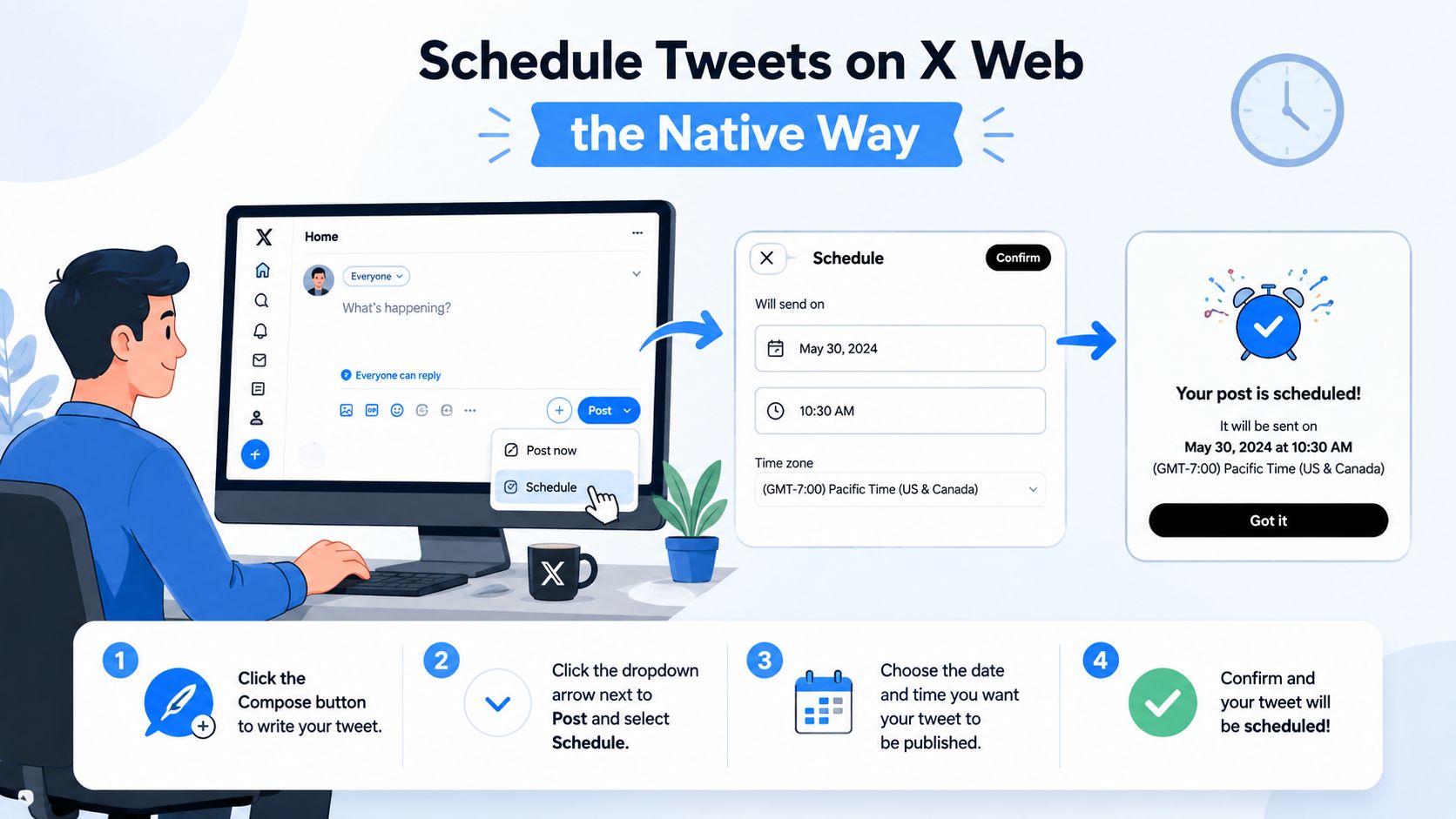
The scheduling panel gives you separate controls for the date and time. Check the displayed timezone before confirming. A time that looks correct on your laptop may not represent the local time you had in mind if your account settings and current location differ.
The delivery setting beginners miss
Look beneath the scheduling controls for Promoted-only. X's help documentation explains that selecting or unselecting this option determines whether the scheduled post is delivered only through ads targeting or scheduled as a normal organic post. If you're planning ordinary timeline content, make sure the option is not selected. If you're intentionally preparing paid delivery, verify the campaign context before confirming.
That distinction changes the job the post is being asked to do. A creator scheduling a launch announcement for followers doesn't want to accidentally place it in an ads-only workflow.
Confirm the schedule, then open the profile menu and go to Drafts & scheduled. Your queued post should appear in the scheduled area, where you can inspect or remove it before publication. X documents scheduled tweets as part of its platform tooling, including retrieval, listing, and deletion, and notes that deletion is permanent once performed in the relevant API workflow. You can review SupaBird's native scheduling walkthrough for the same basic publishing path in a broader workflow.
Native scheduling is useful, but it's intentionally narrow. It doesn't provide a strong visual calendar, recurring scheduling, or a comfortable bulk-upload process. If you're preparing a handful of posts across several handles, the repeated composer steps become the bottleneck. That's when a deck-based or third-party system starts earning its place.
Scheduling From Mobile and TweetDeck
The official X mobile app isn't a dependable native scheduling environment. If you're holding a phone in an airport or between meetings, the practical choices are a mobile browser, a dedicated scheduling platform, or a TweetDeck-style interface that remains accessible to your account.
A mobile browser can sometimes provide a desktop-like route, but it tends to be awkward. Small controls, account switching, and media selection make it easy to choose the wrong profile or timezone. For mobile-first publishing, a third-party app generally offers a cleaner composition and review experience.
TweetDeck's strength is its column-based layout. When available through your account or a newer Pro interface, create a Scheduled column, compose the post, choose the date and time, and place it into the queue. For batches, you can paste prepared copy into the relevant workflow rather than opening every post as a separate browser task.
Why power users still prefer a deck
A deck is most useful when publishing is only one part of the job. You can keep scheduled content beside drafts, replies, mentions, and direct messages, which reduces the need to jump between screens while managing several brand handles.
Some deck-style workflows also let you move a scheduled post to a new time slot from the calendar or queue view. That visual adjustment is more practical than opening each item, changing the picker, and saving it again.

Use TweetDeck when monitoring matters as much as publishing. Use a mobile-friendly scheduler when your priority is drafting, attaching media, and approving content from a phone. Neither approach replaces judgment. A breaking event, customer complaint, or major product change should trigger a review of the queue before automated posts continue.
Comparing Third-Party Schedulers
Third-party tools differ less in their ability to press “publish” than in the work surrounding publication. A solo creator may care most about a fast calendar and thread composer. An agency may need approvals, multiple workspaces, and reporting. An enterprise team may prioritize permissions, audit trails, and cross-network governance.
SupaBird fits a focused X workflow with a visual calendar, a bulk CSV importer, and split-test drafts. Buffer is often easier for a lightweight multi-network queue, while Hootsuite and Sprout Social-style platforms are more appropriate when reporting and team operations matter. Later is useful for teams that plan visually across social channels, although its fit depends on how central X is to the publishing mix.
The comparison below avoids treating every tool as interchangeable. Analytics depth and collaboration features usually matter more than the scheduling button itself.
Third-party tweet scheduler comparison
Tool | Starting Price | AI Assist | Analytics Depth | Thread Support | Recurring Schedule | Best For |
|---|---|---|---|---|---|---|
SupaBird | Check current plan | Draft ideas, rewrites, and format support | X-focused performance review | Yes | Yes | X creators and founders |
Buffer | Check current plan | Copy assistance varies by plan | Practical post and account reporting | Yes | Yes | Solo creators using several networks |
Hootsuite | Check current plan | Writing assistance varies by plan | Broad multi-network reporting | Yes | Yes | Small marketing teams |
Later | Check current plan | Caption support varies by plan | Visual and channel-level reporting | Limited by workflow | Yes | Visual content teams |
Sprout Social | Check current plan | Writing assistance varies by plan | Deeper team and network reporting | Yes | Yes | Agencies and enterprise teams |
TweetDeck-style services | Check current plan | Usually limited | Depends on provider | Varies | Varies | Multi-account monitoring |
Prices, limits, and included features change, so confirm the current entry tier before buying. A useful comparison should also check how many scheduled posts each queue or workspace permits, whether AI can rewrite a draft rather than merely suggest a caption, and whether analytics include impressions, engagement rate, and follower conversion.
Decision shortcut: Choose the lightest tool that supports your approval, media, thread, and reporting requirements. Extra features become extra maintenance when your workflow doesn't use them.
For a detailed feature-oriented comparison, review the guide to X scheduling tools in 2026. The best choice depends on seat count, account count, and whether your team needs a content calendar or a full social operations hub.
Finding the Best Time to Schedule
Broad timing research gives you a starting point, not a permanent answer. A large benchmark summarized by Social Media Today placed X's strongest posting window from Tuesday through Thursday, 9 a.m. to 2 p.m. That multi-hour range is more useful than pretending one exact minute works for every audience.
Cross-study comparisons also identify a midweek morning pattern, commonly around 8 a.m. to 11 a.m. local time, with some datasets extending into afternoon hours. The important qualifier is audience context. Geography, industry, content format, and follower behavior can move the useful window materially, so treat the wider X timing benchmark as a testing boundary rather than a rule.
Build your own heatmap
Use 60 to 90 days of tweet-level history for a meaningful first pass. Export the available analytics, normalize every timestamp into the audience's local timezone, and create columns for day, hour, impressions, engagement rate, and sample size. A simple spreadsheet pivot can then group performance by weekday and hour.
A practical 30-minute workflow looks like this:
Remove deleted, duplicated, or clearly accidental posts.
Convert each timestamp to the timezone of the audience you're evaluating.
Group posts by weekday and hourly slot.
Calculate average impressions and engagement rate for each bucket.
Mark slots that perform above your account average across multiple weeks.
Ignore a slot if it has fewer than 5 to 10 posts, because one unusually strong post can distort the result. This threshold is part of the practical scheduling analytics workflow.
If your audience spans Berlin, London, New York, and Mumbai, don't flatten those people into one universal time. Create market-specific windows, then alternate them so one region isn't always receiving your posts at its least convenient hour. SupaBird's timing guidance for X can help establish an initial test plan, but your own results should decide what stays.
Consistency beats chasing a mythical perfect hour. Keep the testing window stable long enough to compare like with like, then adjust one variable at a time.
Threads, Media, Edits, and Cancellations
A scheduled post can fail even when the date and time are correct. The usual causes are an overlong thread, a missing attachment, a timezone mistake, or a draft that needed one final edit but was already locked into the queue.
For a thread, write each post as a separate unit and check that the sequence makes sense without relying on a missing transition. X's standard limit is 280 characters per post, while X Pro supports up to 25,000 characters, according to X character-limit guidance. A long announcement should be shortened or split into a thread rather than forced into one crowded update.
SupaBird's thread composer lets you prepare the chain together and publish the sequence at one timestamp. That's useful for an announcement where the opening post sets the promise, the middle posts explain the details, and the final post gives the next action. Use this X thread template resource to structure the sequence before loading it into your queue.
Media needs its own preflight
Attach the image, video, or GIF while drafting, not after scheduling. Check how the crop looks in the composer, add useful alternative text where available, and confirm that the post still makes sense if the media fails to load.
Before you approve a media post, verify:
Image layout: Important text isn't hidden by cropping.
Video playback: The file opens and the first frame communicates the point.
GIF context: The animation adds meaning rather than distracting from the copy.
Accessibility: Descriptions explain what a reader needs to understand.
X's editing rules are strict for scheduled workflows. A published post can be edited during a 30-minute window and edited up to 5 times, while scheduled posts aren't editable according to X's edit-post documentation. Proofread the queued version before it goes live. If you spot a problem after publication, use the available editing window carefully instead of making repeated rushed changes.
To cancel a native post, open the scheduled list, select the item, and delete it before publication. In a third-party queue, use the queue panel to reschedule or remove the item. If publishing has already started, treat the action as uncertain and verify the live timeline before creating a replacement, or you may publish duplicates.
Your First Week of Scheduled Posting
A first week should establish a repeatable habit, not fill every available slot. Use your analytics to choose two audience-active windows, then collect enough comparable posts to learn whether those windows hold up.
Day 1
Pull 60 to 90 days of tweet analytics, normalize the timestamps for your audience, and identify two promising windows. Record the reasoning in a simple spreadsheet so you can compare the decision with later results.
Day 2
Load seven posts into SupaBird's calendar across those windows. Make one announcement a thread of 4 to 5 connected tweets, with a clear opening hook and a final action. Keep the remaining posts varied so you're not testing timing against one format only.
Day 3
Add one image and one video to two scheduled drafts. Preview both and confirm that the media renders correctly on web and mobile timelines. This catches upload and cropping problems before they become public corrections.
Day 4
Review the queue panel. Move any post that crowds another important update, and remember that scheduled posts aren't editable once queued on X, so make final copy changes before confirming the slot.
Day 5
Compare scheduled posts with same-day posts using the same measures, such as impressions and engagement rate. Don't declare a winner from one post. Look for a pattern across several comparable updates.
Day 6
Create reusable composer templates for recurring formats, such as a practical tip, a link explanation, and a question. Templates should speed up structure, not remove the human voice from the final draft.
Day 7
Audit the week, keep the two strongest time slots, and queue the following batch. Leave space for live replies and timely posts. Scheduling compounds when each prepared week gives you more time to participate in the conversations that create trust.
SupaBird combines an X-focused calendar with drafting, queue management, thread planning, and timing support for creators and marketers who want a repeatable publishing routine. Visit SupaBird to explore the workflow and start building your next scheduled batch.

The Reply Guy Strategy: A Growth Guide for X

Why New X Accounts Get Less Reach

ClimbX Review (2026): Features, Pricing, Pros and Cons

How Developer Startups Build a Brand on X Before Launch

30-Day Starting Plan for New X (Twitter) Accounts

How Often Should You Tweet for Maximum Growth?

What Should Your First 10 Tweets Be About?

How to Run X for Ten Clients: The Agency Workflow

How to write a bio that gets people to follow you
