
You're probably here because X search let you down again.
You remember the shape of the post. Maybe it was a one-line hook about pricing, a thread on editing, or a reply from a founder you meant to bookmark. You type the obvious words into X, get a pile of low-signal results, hit a login wall, or land in a feed stuffed with fresh noise instead of the old post you need.
That's when Twitter search Google becomes the practical move.
Google won't replace X's own search. It does something different. It gives you a second index, a second ranking system, and a second chance to find posts, profiles, and threads that X's interface buries. If you write online, research competitors, or do outreach on X every week, that second layer matters more than most guides admit.
Table of Contents
Why Google Is Still Your Best Backdoor Into X
You search a line you half-remember from a tweet. X gives you fresh chatter, copied takes, and accounts you have never seen. Google often finds the post faster, or at least gets you close enough to confirm the author, thread, or angle.
That advantage comes from how Google treats X as part social network, part web archive. It crawls public profile pages, individual posts, reply pages, and thread fragments on its own schedule. X search is built for activity inside X. Google is better at retrieval from outside it, especially when you remember a phrase, a topic, or a brand name but not the handle.
The old real-time indexing partnership between Twitter and Google ended years ago, but the workflow survived because it still solves a practical problem. Public X content continues to appear in normal Google results, and older results can stick around for a while even after pages change. For creators, that lag is sometimes useful. It can surface an old hook, a thread opening, or a profile page that X no longer puts front and center.
What shows up reliably?
Public posts with memorable wording
Profile pages for founders, creators, and brands
Reply and thread URLs that expose part of the conversation
Search snippets that confirm you found the right post before you click
The trade-off is simple. Google is better for discovery when memory is fuzzy. X is better once you know the account and want native filters, live results, or engagement context.
I use Google first for three jobs: finding an old tweet hook, checking how a competitor framed a topic over time, and locating prospects who have already talked about a pain point in public. That is the value of "twitter search google." It is not a trick. It is a second search engine for X, with better operator control and a different index.
Google also gives you tools X still does not handle as cleanly in one place. You can combine site: filters, exact-match quotes, custom date ranges, and even cached versions when a result is flaky. That makes it useful for creator workflows that are half research, half recovery. If you care about how posts get discovered across both platforms, this breakdown of Twitter search engine optimization is worth reading.
A quick walkthrough helps if you want to see the mindset in action:
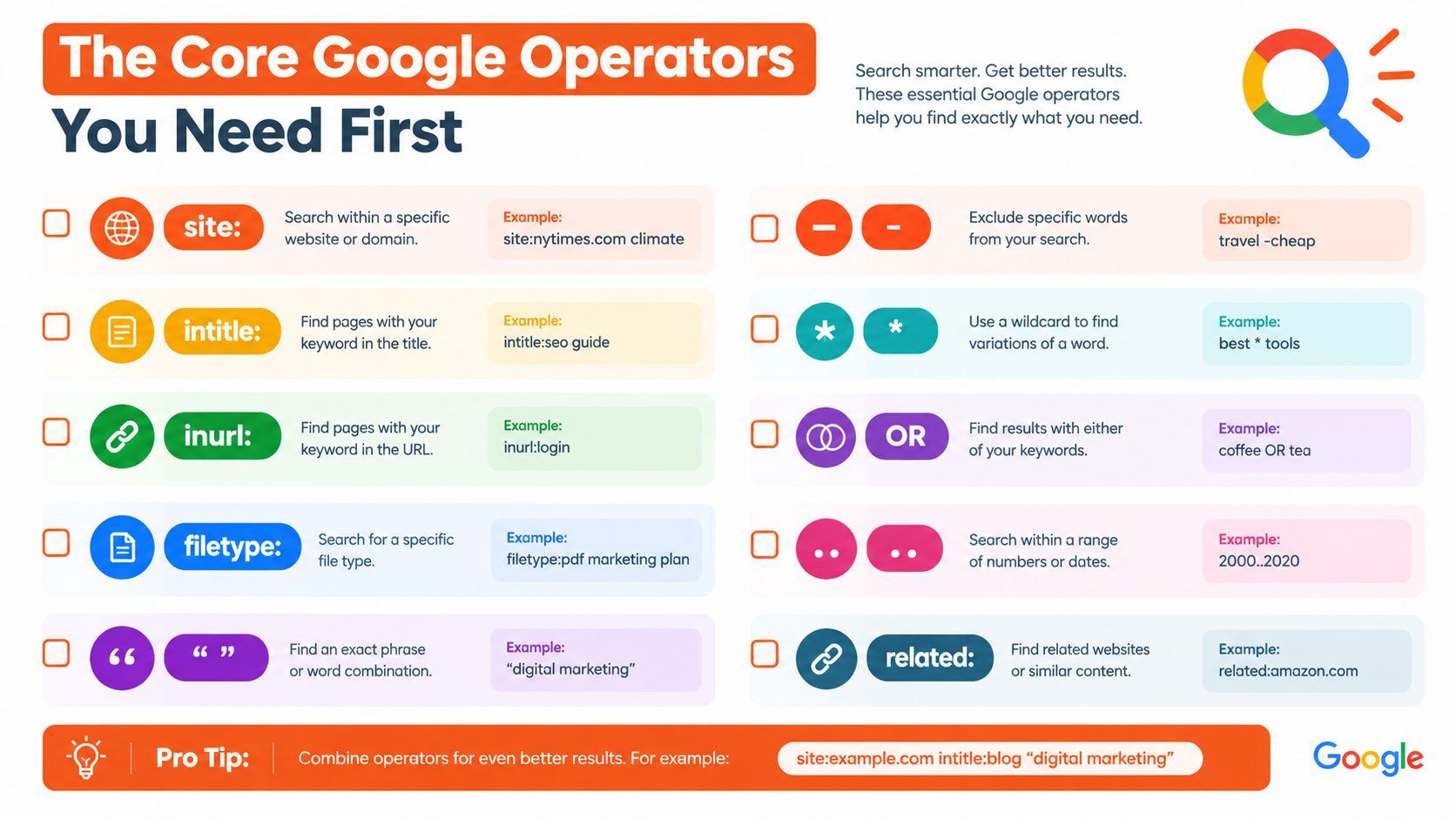
The Core Google Operators You Need First
You don't need to overcomplicate this. You don't need a giant operator cheat sheet. You need a small stack you can remember and use fast.
Start with site and quotes
site: tells Google which domain to search.
Example:
site:x.com pricing threadsite:twitter.com "cold email"
That instantly cuts out blog posts, YouTube videos, and forums discussing the tweet instead of the tweet itself.
Quotation marks force exact phrase matching.
Example:
site:x.com "nobody cares about your product"site:twitter.com "write like you talk"
This is the move when you remember one sharp line from a post.
Add exclusions and alternatives
The minus sign removes noise.
Example:
site:x.com "launch day" -giveaway -winnersite:twitter.com SaaS hooks -retweet
If a phrase is common in spammy promo posts, exclusions clean it up fast.
OR gives you variants in one query. Use uppercase OR. Lowercase usually weakens precision. That's one of the common failure points noted in this guide to X advanced search operators.
Example:
site:x.com founder OR marketer "looking for"site:twitter.com "build in public" OR "indie hacker"
Use intitle and inurl when results get messy
intitle: asks Google to prioritize words in page titles. On X, this isn't always as powerful as on normal websites, but it can still help with profile pages and broader indexed surfaces.
Example:
site:x.com intitle:newslettersite:twitter.com intitle:founder
inurl: is often more useful for X because post URLs and media pages follow patterns.
Example:
site:x.com inurl:status pricingsite:twitter.com inurl:photo "product demo"
filetype: can help when you're chasing attached documents or media references elsewhere on the web, but for direct tweet hunting it's usually secondary.
Google operators work best when each operator removes one kind of noise. Don't stack five vague terms. Stack two strong filters and one memory cue.
Once you get comfortable with site:, quotes, -term, OR, and inurl:, you can narrow directly to tweet pages and profile pages instead of searching the whole web.
Narrowing Results to Tweets and Profiles
Searches stop feeling random.
If you want actual posts instead of commentary about posts, use domain and URL patterns that match how X structures pages.
The base patterns that work
Start with both domains when coverage matters:
site:twitter.com OR site:x.comsite:x.com inurl:statussite:twitter.com inurl:status
inurl:status is the key pattern for individual posts. It strips away a lot of profile and support-page clutter.
Examples you can paste:
site:x.com inurl:status "positioning"site:twitter.com inurl:status "hook" "edit"site:x.com inurl:status "landing page" "conversion"
That second query is especially useful for finding editor and copywriter threads. If you vaguely remember a thread about improving hooks, site:twitter.com inurl:status "hook" "edit" often gets you closer than searching those words inside X.
Finding a specific account's posts and profile
When you know the handle, combine the handle with post patterns.
Try:
site:x.com inurl:status "by @handle" keywordsite:twitter.com "@handle" inurl:status keyword
Profile discovery is slightly different. Google often ranks profile pages well for names, niches, and branded terms.
Try:
site:x.com "founder" "AI" "@handle"site:twitter.com inurl:/handle
If you're doing engagement research, SupaBird Engage workflows for finding and replying to the right posts on X faster line up well with this method. Use Google to find the conversations, then move into your engagement tool or X itself to reply.
Media and thread variations
You can also search media-specific paths and clues:
site:x.com inurl:photo "design system"site:twitter.com inurl:video "demo"site:x.com inurl:status "thread" "pricing"site:twitter.com inurl:status "1/" "acquisition"
A few practical notes:
For threads: search one memorable phrase from the middle, not the obvious topic word from the beginning.
For profiles: search the niche plus the person's name, not just the handle.
For old posts: test both
twitter.comandx.com, because indexing can be uneven.
Google also indexes X content on the x.com host after the migration, and public posts, profiles, and articles can rank for brand names, people, news, and topic searches, according to this independent overview of finding X posts in Google. That's why explicit wording in post text still matters.
Combining Filters for Surgical Searches
A broad query gets you possibilities. A stacked query gets you usable results.
The easiest win is adding date filters. Google supports before: and after:, which makes a huge difference when you're searching around a launch, a trend spike, or a specific conference week.
Build the query in layers
Start broad:
site:x.com inurl:status "AI agent"
Now tighten it:
site:x.com inurl:status "AI agent" after:2024-01-01 before:2024-03-01
Then cut noise:
site:x.com inurl:status "AI agent" after:2024-01-01 before:2024-03-01 -giveaway -job
Then add variants:
site:x.com inurl:status ("AI agent" OR "AI agents") after:2024-01-01 before:2024-03-01 -giveaway
That's the difference between scrolling and finding.
Stack Level | Query Pattern | Typical Result Range |
|---|---|---|
Broad |
| Very wide, mixed pages |
Better |
| Narrower, mostly posts |
Strong |
| Focused set |
Surgical |
| Tight, research-ready set |
A few combinations worth saving
Launch window research
site:x.com inurl:status "product hunt" "@competitor" after:2024-05-01 before:2024-05-15Spam reduction on trend searches
site:twitter.com inurl:status "newsletter growth" -giveaway -templateIdea mining across wording variants
site:x.com inurl:status ("short-form video" OR "short form video") "hook"
If you're in a visual niche, it can help to collect references outside X too. A tool like creative filter for artists is useful when your search process includes style references, not just posts, because visual inspiration often feeds the wording of hooks and replies.
For on-platform filters after you identify a promising phrase, Twitter advanced search on mobile is a good companion workflow.
The winning habit is simple. Add one operator per problem. Too broad means add
inurl:status. Too old means add dates. Too noisy means subtract terms.
Creator Use Cases That Actually Pay Off
This gets useful when you attach it to a workflow, not a trivia game about operators.
Competitor research around a launch
Say a competing creator launched a course, template pack, or SaaS feature. X search will show the loudest posts. Google often helps you recover the surrounding conversation.
Paste this:
site:x.com inurl:status "@competitor" ("launched" OR "launch") after:2024-06-01 before:2024-06-30
What you'll usually get:
launch tweets
replies discussing objections
quote posts reacting to the offer
thread fragments with positioning language
Follow-up action:
pull recurring phrases into a doc
note objections and promises
write your own post answering the angle they left weak
For fresh content ideas after that review, this guide to finding content ideas pairs well with a Google-first workflow.
Trend discovery before the feed gets saturated
Native X search is good when a trend is already obvious. Google can be better when you want the first wave of public wording around an idea.
Paste this:
site:twitter.com inurl:status "#buildinpublic" -"RT" after:2024-01-01site:x.com inurl:status "AI wrapper" -giveaway after:2024-01-01 before:2024-02-01
What you're looking for:
repeated hook formats
the first phrasing that people copy
adjacent terms that become the actual search demand later
Follow-up action:
create one post using the exact audience language
save three related phrases for later searches
check whether the discussion is mostly founders, marketers, or developers
Outreach prospecting with intent clues
This one is underrated. People announce their needs in public all day.
Paste this:
site:x.com inurl:status ("looking for" OR "need a recommendation") (copywriter OR designer OR growth)
Or for niche outreach:
site:twitter.com inurl:status ("anyone know" OR "looking for") "email deliverability"
What you'll usually find:
recommendation requests
tool comparison posts
people actively trying to solve a problem
Follow-up action:
reply publicly if you can help
quote the post with a useful answer if direct pitching feels pushy
save the account into your prospect list
A lot of creators over-search and under-act. The value isn't the query. The value is the reply, the lead, or the post you publish after reading the results.
Pairing Google With X's Own Advanced Search
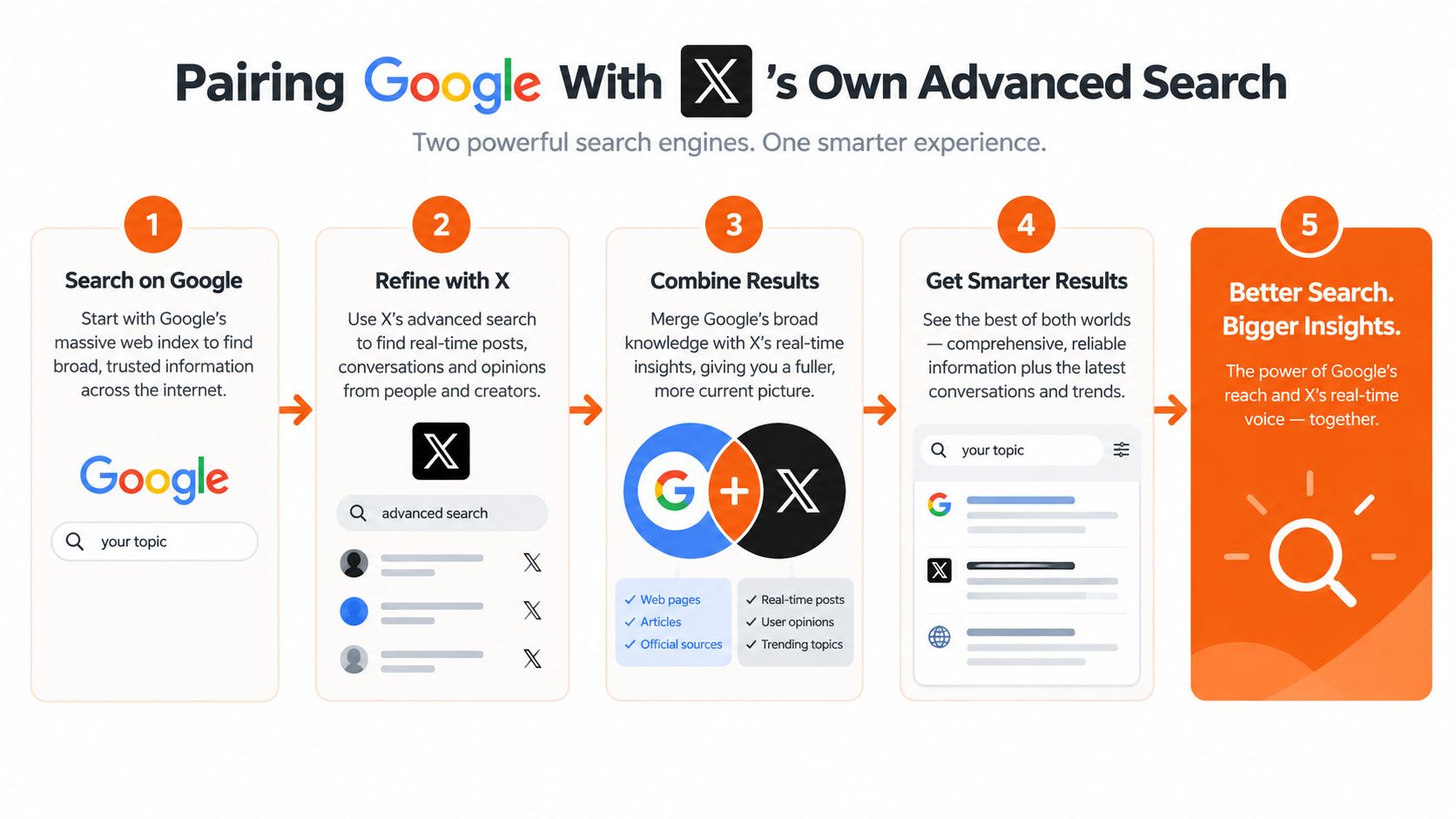
The strongest workflow uses Google for discovery and X for refinement.
Google's indexing of Twitter and X content is incomplete and slow. A large study cited by this review of Google indexing delays reported an average indexing delay of 27.4 days, and the same source says earlier research found Google had indexed 6.2 billion Twitter pages, still a small share relative to roughly 500 million tweets per day. That's why you shouldn't expect Google to be your live feed.
Use Google first, then switch tools
A practical sequence looks like this:
Search Google for a phrase or topic with
site:x.comandinurl:statusIdentify the wording, handles, and angles that keep repeating
Move into X search and refine with operators such as
from:,to:, quotes,since:,until:,filter:replies,filter:links, andmin_faves:Save the best posts, then reply or draft your own take
X's own search syntax is the technical edge on-platform. X's developer documentation also splits search into two endpoints: /2/tweets/search/recent for the last 7 days and /2/tweets/search/all for the full archive with higher-tier access. That matters if your workflow mixes manual search with API-driven research.
Where each tool wins
Google tends to win when you need:
Broader discoverability across indexed public posts and profiles
Snippet context when you only remember part of a line
Off-platform traces because blogs and newsletters often embed or quote X posts
X wins when you need:
Freshness
Account-level filtering
Reply and link filters
Cleaner narrowing once you know the exact phrase or author
If you work in founder circles, Twitter advanced search founders has some useful query ideas for the X side of the workflow.
One tool worth noting here is SupaBird. It's an X-focused assistant with idea generation, engagement discovery, and draft rewriting. In this workflow, a tool like that fits after research, once you've found the angle and need to turn it into a reply or post.
Google gives you breadth. X gives you precision. Using only one usually means you're either late or lost.
Common Roadblocks and Smart Workarounds
You find the perfect hook in Google, click through, and hit a login wall, a dead post, or a result that only shows half the sentence. That is normal now. Google still works as a second search engine for X, but it works best when you treat it like a recovery tool, not a live feed.
The main friction is inconsistency. Google can surface public X posts and profiles, but indexing is uneven, host coverage is split between twitter.com and x.com, and newer posts often lag. Independent coverage has pointed to the same pattern. Public content still appears in search, just with fewer guarantees than it had in earlier years, as summarized in this overview of Google as a backdoor into X.
The failures you'll hit most often
A few problems show up again and again in real workflows:
Login redirects that block the full post when the Google result looked promising
Thin snippets that only show “Tweet” or a fragment of the text
404s and suspended accounts where Google kept the URL longer than X kept the post live
Coverage gaps where
site:twitter.comreturns something thatsite:x.commisses, or the reverseFresh posts missing because Google has not crawled them yet
An independent SEO analysis also notes that X allows limited access for major search crawlers while restricting others, which helps explain why some public pages still rank while coverage stays uneven. That same analysis is useful if you want the technical version of why indexing feels unpredictable: this analysis of X crawling and search visibility.
Workarounds that are actually worth trying
Run these in order. This is the shortest path I know when a search starts going sideways.
Switch hosts first
Search bothsite:twitter.comandsite:x.com. I often run the same query on both because one host can still have an older indexed path that the other does not.Loosen the phrase
If"exact phrase"returns nothing, remove the least distinctive word first. Google often indexes a clipped version of the visible post, especially when the tweet text was quoted elsewhere.Add a date window
Useafter:andbefore:when you roughly know the month or campaign period. This cuts out recycled quotes and old embeds fast.Search for the profile, then finish inside X
If the post will not surface, the profile often will. Open the account, then use X's own search to look for the phrase, keyword, or link on that profile.Use cache and quoted fragments for deleted or changed posts
Google will sometimes keep a result snippet after the live post is gone. Search the most distinctive line in quotes, then check whether blog posts, newsletters, or roundup pages copied the tweet text.If the goal is removal, not discovery, wait for re-crawling and use Google's outdated content process
As noted earlier, public pages can remain indexed for a while after visibility changes on X. That is a removal problem, not a search problem.
No workaround fixes everything. But combining host checks, phrase changes, date filters, and off-platform quote searches recovers a surprising amount of creator research. This is especially useful for competitor thread mining, finding old hooks that got traction, and pulling receipts before outreach.
If you're already using Google to dig up old posts, find active conversations, and spot reply opportunities, SupaBird fits naturally after the search step. It helps turn what you find into usable content ideas, better replies, and scheduled posts so the research doesn't just sit in tabs.

How Developer Startups Build a Brand on X Before Launch

30-Day Starting Plan for New X (Twitter) Accounts

How Often Should You Tweet for Maximum Growth?

What Should Your First 10 Tweets Be About?

How to Run X for Ten Clients: The Agency Workflow

How to write a bio that gets people to follow you

Digital Product Launch Strategy

Best Twitter Growth Service for Creators in 2026
From X to Every Platform: Repurpose Without Flopping
