AI Tweet Generator: How to Write Viral Posts in 2026
Author:

The popular advice is simple: generate more tweets, post more often, and growth will follow. That advice misses the most expensive part of the process. X rewards recognizable ideas, useful perspective, and genuine conversation, not an endless stream of polished filler.
An AI tweet generator can remove the blank page, produce variations, and keep a content calendar moving. It can also make your account sound like every other account using the same prompts. The practical advantage isn't publishing without thinking. It's using AI to create more starting points while keeping your judgment, experiences, and voice in control.
Table of Contents
Why More AI Tweets Does Not Always Mean More Growth
More output creates more chances to publish, yet it does not automatically give people a reason to follow. A polished post about productivity, marketing, or entrepreneurship can still be forgettable. X readers quickly recognize recycled hooks, inflated optimism, predictable list formats, and opinions with no personal stake.
The authenticity gap drives the problem. A 2026 experimental study found that some generative AI tools increased engagement and content volume while reducing perceived quality and authenticity, with negative spill-over effects on conversations (IBIMA Publishing's experimental study). An account can attract attention through higher output while weakening trust in the person behind it.
Practical rule: Use AI to increase your options, not to remove your responsibility for the final opinion.
Follower growth usually follows a recognizable point of view. A founder can explain what a failed launch taught them. A developer can defend an unpopular implementation choice. A marketer can show the reasoning behind a campaign decision. AI can shape those raw materials into clearer posts, but it cannot provide the lived experience or personal stakes that make them credible.
Where volume helps
Volume works when it supports a deliberate content mix. An AI tweet generator can turn one strong idea into a hook, concise explanation, reply prompt, and thread outline. You gain several ways to distribute an insight without inventing a new worldview every morning.
It also supports a consistent publishing routine. The AI writing assistant market has become a durable software category. One estimate values it at US$1.8 billion in 2024 and projects US$12.6 billion by 2033, with a 23.9% CAGR (MarketIntelo's AI writing assistant market estimate). That market estimate is a proxy rather than a direct measurement of tweet-generator revenue, but it indicates that AI-assisted drafting is becoming part of repeatable workflows instead of remaining a novelty.
The useful target is a reliable publishing system. Let AI handle ideation, variations, and rough drafts. Keep specificity, stance, personal evidence, and conversational relevance under human control. Before publishing, remove any claim you cannot defend, replace generic phrasing with your own language, and check whether the post sounds like something you would say.
How AI Tweet Generators Work
An AI tweet generator does not discover your point of view. It predicts language from your instructions, examples, and the patterns in its training data. You supply the raw idea, audience, and position. The tool then reshapes that material into a single post, thread opener, question, or reply.
A useful generation workflow starts with four inputs:
Topic: What the post covers.
Audience: Who should care and what they already understand.
Voice: How you normally express an idea.
Format: The structure, length, and purpose of the post.
A weak prompt says, “Write a tweet about customer research.” With no defined angle, the system usually reaches for familiar marketing language. A stronger prompt gives it a claim, audience, tone, and constraint: “Write a direct post for indie SaaS founders arguing that customer interviews should happen before feature planning. Use one concrete scenario, avoid hype, and end with a question.”
The model does not understand your life as a friend would. It generates text from patterns, context, and instructions. It can remix a strong idea quickly, yet it may invent a detail, soften your position, overstate a result, or introduce wording you would never use. Human review protects the part that drives trust: specific experience expressed in a recognizable voice.
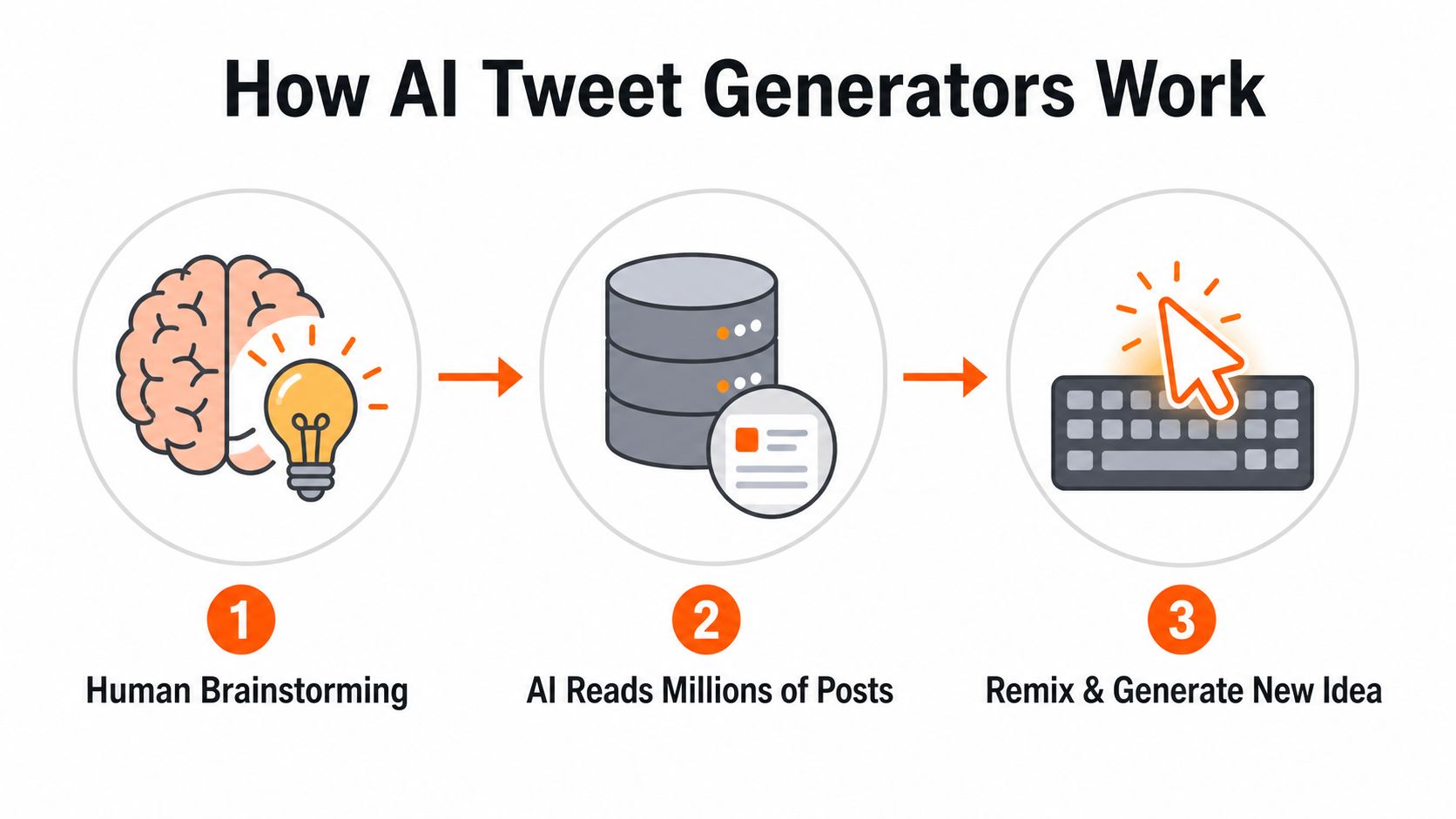
Simple completion versus guided generation
Basic tools provide a text box and a few presets. You choose a topic and tone, then receive a draft. That can break writer's block, but the result often sounds anonymous because the tool knows the subject without knowing your account.
More capable systems accept winning examples, recurring content pillars, preferred formats, and editing rules. They can turn one rough draft into several alternatives, preserve a stated position, or repurpose long-form material into short posts. The quality gap usually comes from context and review, not from pressing a more impressive button.
The same principle applies to broader content operations. The guide to how AI writes SEO content shows how AI can serve as a structured drafting layer instead of an unattended publisher.
AI writing became widely used after ChatGPT's launch. A 2026 industry summary reports 700 million weekly active users, 18 billion messages per week, and adoption by 92% of Fortune 500 companies (Luminix's 2026 competitive overview). For tweet generators, the practical implication is familiarity. Creators already understand prompting, revising, and refining generated text, so useful products fit those actions into a daily workflow rather than selling novelty.
For a practical example inside a creator-focused product, read SupaBird's X-GPT support article.
Prompt Templates and Workflows That Produce Results
A tweet generator earns its place when it increases output without erasing the person behind the account. Prompts that ask AI to “make it viral” usually produce generic copy. Better prompts define the reader, tension, evidence, desired reaction, and boundaries. Tell the tool what to avoid too: vague openings, corporate jargon, unsupported claims, and hashtags.

Five prompts worth saving
Hook generator
Write five opening lines for a post about [topic] aimed at [audience]. Each line should challenge a common assumption or reveal a specific tension. Keep the language conversational. Avoid hype, hashtags, and generic phrases such as “unlock your potential.”
Example input: “pricing a small SaaS product for technical buyers.”
Expected direction: “Your pricing page isn't confusing because you lack features. It's confusing because you're trying to justify the price instead of naming the outcome.”
Thread opener
Create three thread openers about [idea]. Promise a specific lesson, name the audience, and create curiosity without exaggerating. Keep each opener concise. Do not use a claim that requires evidence unless I provide the evidence.
The first post has one job: earn the next read. Later posts can carry context, examples, and qualifications.
Contrarian take
Turn this belief, “[common belief],” into a defensible contrarian post. Explain what the belief gets wrong, state the more useful alternative, and include one practical example. Sound confident but not insulting. Preserve the original meaning and don't invent results.
Story-based post
Rewrite these notes into a personal X post: [notes]. Start with the most specific moment, retain my uncertainty and emotional detail, and don't add events that aren't in the notes. End with the lesson only if it feels earned.
Human input sets the credibility ceiling. If you didn't experience the moment, don't let the tool manufacture it.
Engagement question
Write four questions for [audience] about [topic]. Each question should invite a nuanced answer rather than a yes-or-no response. Make the questions easy to answer from personal experience and avoid engagement bait.
For a closer look at prompt anatomy and templates, separate context, constraints, examples, and the required output instead of placing everything in one vague request.
A repeatable content workflow
Start with one source idea, not a blank calendar. Use a customer objection, product lesson, article section, podcast note, or reply you wrote manually. Ask the AI tweet generator for angles before requesting drafts.
Extract angles: Request opposing views, practical applications, mistakes, examples, and questions related to the source.
Choose the strongest angles: Keep ideas connected to your actual experience or a clear audience problem.
Generate formats: Turn each angle into a short post, thread opener, reply, and question.
Edit the first line: Replace the safest opening with your clearest claim or most specific detail.
Restore your voice: Add a phrase, example, admission, or opinion you would naturally use.
Fact-check every detail: Remove invented numbers, outcomes, and quotations.
Schedule with intention: Separate related posts and leave room for real-time replies.
The best Twitter post templates in 2026 can expand your format library while keeping each post tied to a different idea.
Use this prompt to create a compact batch:
I'm building a content batch from this idea: [idea]. Give me one sharp opinion, one practical tip, one short story angle, one objection, and one question. For each, explain the intended reader reaction in one sentence. Don't write final posts yet.
Generate only the formats you select. That filter prevents polished drafts from multiplying before you know what you want to say.
The final pass should sound slightly less polished than the first draft. Cut introductions, remove inflated adjectives, replace abstractions with concrete nouns, and keep a little friction. Add the opinion or detail only you would write. Volume comes from the generator. Trust comes from the human edit.
Data-Driven Rules for Tweet Length Timing and Frequency
AI can produce polished drafts quickly. Distribution still determines whether a useful idea reaches enough people to earn replies, reposts, and follows. Length, timing, and frequency should support the idea and your human voice, not turn publishing into automated filler.
Longer posts can outperform short ones when the extra space adds context. Research on Twitter's expanded character limit found that tweets above 140 characters averaged 26.52 retweets, compared with 13.71 for shorter tweets. Average likes also rose from 29.96 to 50.28 for the longer group (BuzzFeed News' analysis of longer tweets). Use the available space for a complete explanation, a useful example, or a clear qualification. Do not stretch a thin idea toward the 280-character ceiling. Later adoption data found that tweets near the ceiling remained uncommon.
Timing also needs testing rather than certainty. Independent research found no universal best hour, while engagement clustered in early weekday morning windows. X showed a 6–11 a.m. weekday peak, and Tuesday around 9 a.m. stood out in one 2026 benchmark (MDPI's platform engagement analysis). A separate 2026 analysis cited by Sprout Social placed the strongest overall window from Tuesday through Thursday, 12 p.m. to 6 p.m. local time, with Saturday the weakest day (the cited X posting-time analysis). Audience location, industry, and measurement method can change the result.
A practical operating table
Variable | Recommendation | Supporting Data |
|---|---|---|
Tweet length | Start with concise, high-signal posts. Add length when context, a thread, or a complete explanation improves the reader's understanding. | Posts above 140 characters averaged more retweets and likes in the cited analysis, while posts near 280 characters remained uncommon. |
Posting time | Test local-time windows instead of adopting one global publishing hour. Start with weekday mornings and Tuesday through Thursday afternoon tests. | Research identified a 6–11 a.m. weekday peak, while another benchmark identified Tuesday through Thursday, 12 p.m. to 6 p.m. local time. |
Frequency | Build a spaced calendar that leaves room for replies, original commentary, and timely observations. | Buffer recommends about three to four posts per day, with a sustainable sweet spot around three to five daily (Buffer's frequency guidance). |
Frequency is a planning variable. A calendar should create room for consistent publishing while protecting the interactions that reveal your actual voice. If several scheduled posts rely on the same AI structure, change the angle or reduce output before publishing more.
For timezone-aware planning, use this best time of day to post on X in 2026 resource as a starting point, then compare its recommendations with your audience activity. AI can help maintain volume. Your observations, replies, and edits are what make that volume credible.
Common Pitfalls That Undermine AI-Generated Content
The most damaging AI mistake is often a change in meaning rather than an awkward phrase. Oxford-linked reporting found that open large language models could alter the meaning or direction of user drafts, even when instructed to preserve the original message. The reported examples included contested subjects such as abortion and climate (Oxford-linked reporting on AI writing tools). A smoother rewrite can make you sound more certain, more neutral, or more extreme than you intended.
Read every generated post beside the source idea before scheduling it. Check the stance, reasoning, and emotional temperature. Sensitive opinions, customer promises, and personal experiences deserve extra scrutiny. Write those posts yourself when the wording carries reputational risk, or edit the draft until you can explain and defend every sentence.
The patterns followers notice
AI output becomes easy to recognize when an account repeats the same construction. A familiar “people often think” opener, a three-part list, an upbeat conclusion, and a collection of abstract nouns can make posts feel assembled rather than lived.
Look for these failure modes:
Tone drift: A blunt observation turns into polished corporate advice, or a qualified position becomes an absolute claim.
Unverified detail: The draft adds a “real-world example,” result, or experience that never happened or cannot be supported.
Template fatigue: Every post follows the same hook, rhythm, paragraph length, and closing question.
Conversation replacement: Scheduled posts fill the calendar while replies become shallow, delayed, or automated.
Repost saturation: Reposts can support visibility, but a feed built mainly from other people's content gives followers little reason to trust your perspective.
A 2024 study of 800 Twitter creators found a non-linear relationship between reposting and engagement. Smaller creators saw diminishing returns from frequent reposting, while larger creators could sustain benefits through longer repost sequences. Short segmented repost chains combined with original posts produced higher cumulative engagement in the study (Metricool's report reference). Use reposts as part of a sequence, then add your interpretation so the audience understands why the content matters to you.
Build safeguards into the workflow
Put a human review gate between generation and scheduling. Verify factual claims, preserve your position, remove borrowed phrasing, and ask whether the post gives readers a specific reason to reply. Keep AI responsible for draft volume while your editorial judgment controls what reaches the feed.
Run a weekly audit with five questions:
Which posts contained a firsthand observation, tested lesson, or clear opinion?
Which drafts could belong to almost any account in the same niche?
Did the generator introduce a claim, result, or experience you cannot verify?
Did you answer people in your own words?
Did each repost include commentary that reflected your perspective?
A useful review process accelerates judgment while keeping final responsibility with the person publishing the account.
How to Evaluate and Choose the Right AI Tweet Tool
Choose a tool based on the bottleneck you have. If you struggle to start, a basic generator may be enough. If you have ideas but lose time adapting them into formats, look for rewriting and variation controls. If consistency is the problem, scheduling and calendar visibility matter more than another tone preset.
Compare the operating models
Feature Category | Basic Generator | Growth System |
|---|---|---|
Idea generation | Produces prompts or drafts from a topic | Connects ideas to content pillars, examples, and creator research |
Voice control | Uses broad tone settings | Uses writing samples, style rules, and editable constraints |
Drafting | Creates single posts | Handles variations, threads, replies, and repurposing |
Scheduling | Often absent or limited | Includes a calendar, spacing, and timezone-aware planning |
Engagement | Usually outside the tool | May surface conversations and support reply workflows |
Measurement | Minimal or unavailable | Connects publishing decisions to review and iteration |
The phrase “viral format” shouldn't distract you from the core test. Ask whether the tool helps you say something worth reading, preserve your stance, and learn from the response. A format can improve clarity, but it can't turn an empty idea into authority.
Questions to ask before subscribing
Can it learn your voice from real posts? Broad labels such as “professional” and “casual” rarely capture distinctive phrasing. You should be able to provide examples and inspect the generated result before committing to a workflow.
Does it preserve source meaning? Test the tool with a draft containing a nuanced opinion. Compare the rewrite with the original and look for changes in certainty, scope, or implied promises.
Does it fit your calendar? A useful system should support local-time scheduling, spaced publishing, and a clear view of how posts and threads fit together. A generator that leaves you copying drafts between tabs may save less time than expected.
Does it support conversation? Growth on X includes replies, quote posts, and timely participation. If the product only creates broadcast content, you'll still need a separate process for relationship building.
Can you review before publishing? Automatic posting may sound efficient, but human approval is the safeguard that protects your credibility. Treat one-click publishing as a risk setting, not a benefit by default.
For a wider comparison of writing workflows, review tools for writing viral tweets and compare each option against your actual bottleneck. SupaBird combines Ideas Lab for idea generation, X-GPT for draft rewriting, a scheduling calendar, and X Coach with AI guidance and human mentor access, so it fits creators who need more than isolated text completion.
Your Action Plan for Scaling X Growth with AI
Start small enough to review everything. In week one, collect your strongest existing posts, define three or four recurring topics, create prompts for hooks, stories, questions, and practical lessons, and generate several alternatives for each idea. Publish only the drafts that still sound like you after editing.
During the first month, build a spaced calendar and test local posting windows. Keep original commentary in the mix, reply manually to relevant conversations, and review which ideas earned thoughtful responses rather than judging every post by reach alone. If reposting becomes part of the plan, separate repost sequences with your own interpretation.
For the next quarter, turn the review into a feedback loop. Save strong openings, note recurring audience questions, retire formats that feel repetitive, and update your prompts with examples of your actual voice. The wider guide to AI for a one-person marketing team is useful context for deciding which tasks should be automated and which still need direct human involvement.
An AI tweet generator works best as one layer in a broader system. Let it expand ideas and reduce drafting friction, then keep the final opinion, evidence, editing, replies, and relationships human.
SupaBird combines Ideas Lab, X-GPT drafting, timezone-aware scheduling, and X Coach support for creators who want a structured way to produce and refine X content. Visit SupaBird to explore a workflow that increases publishing capacity without handing over your voice.

The Reply Guy Strategy: A Growth Guide for X

Why New X Accounts Get Less Reach

ClimbX Review (2026): Features, Pricing, Pros and Cons

How Developer Startups Build a Brand on X Before Launch

30-Day Starting Plan for New X (Twitter) Accounts

How Often Should You Tweet for Maximum Growth?

What Should Your First 10 Tweets Be About?

How to Run X for Ten Clients: The Agency Workflow

How to write a bio that gets people to follow you
